ZFS Storage for Virtualization: A Practical Proxmox Guide
Mirrors or RAIDZ? Does a SLOG help? How much RAM should the ARC get? A practical guide to ZFS on Proxmox hosts, with commands, decision tables and the mistakes to avoid.
ZFS is the most capable local storage option for a Proxmox virtualization host: it combines volume management, checksums, compression, snapshots and replication in one system. For VM workloads, the best default is striped mirrors on enterprise SSDs with ashift=12 and lz4 compression, a deliberately sized ARC, and real backups on a separate system. This guide explains the decisions that matter, with commands you can adapt and the mistakes we see most often.
Key takeaways
- Use mirrors for VM disks and databases; use RAIDZ2 for backup targets and bulk storage. Random I/O scales with the number of vdevs, not the number of disks.
- Set
ashift=12at pool creation (it cannot be changed later) and enablelz4compression. - The ARC is RAM ZFS uses as a read cache; cap it so VMs keep enough memory.
- A SLOG only accelerates synchronous writes. A special vdev holds metadata and must be mirrored, because losing it loses the pool.
- Snapshots are not backups. Pair ZFS with Proxmox Backup Server and an off-site copy.
Why ZFS for virtualization hosts
ZFS checksums every block and verifies it on read, so silent corruption is detected and, with redundancy, repaired automatically. It also gives you instant snapshots, efficient replication between nodes and transparent compression, all integrated in the Proxmox VE installer and web UI. The tradeoff is that ZFS rewards good design up front: some choices (vdev layout, ashift) are hard or impossible to change once the pool holds data.
Mirrors vs RAIDZ for VM workloads
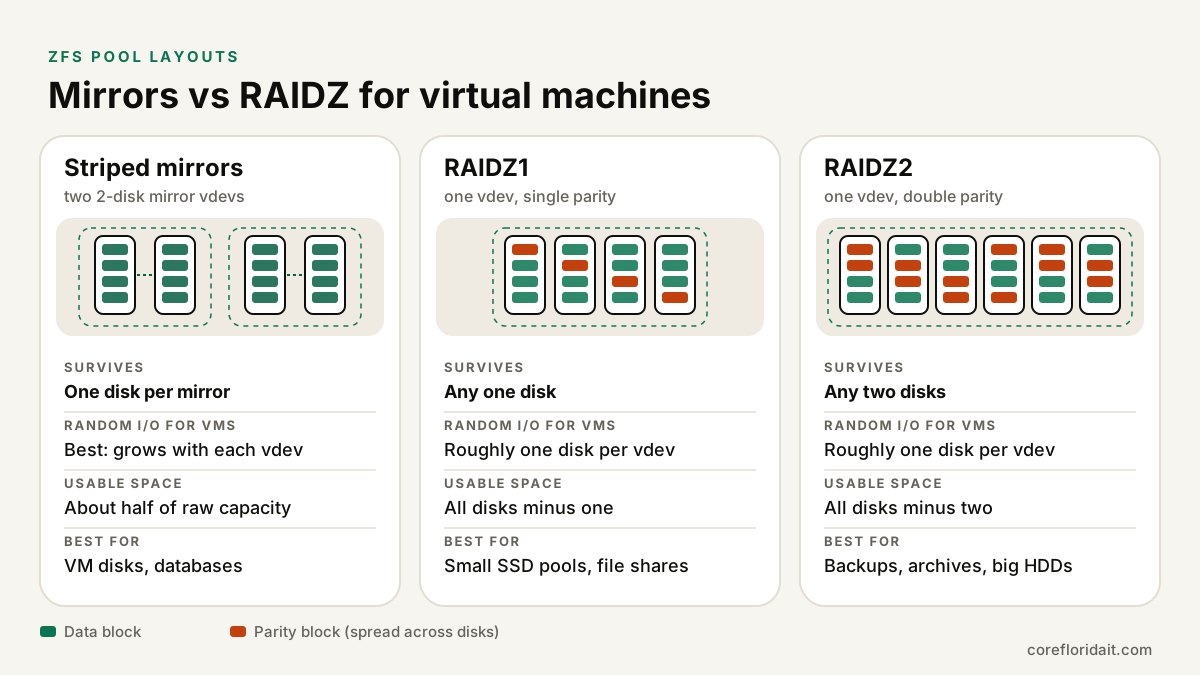
A pool is made of one or more vdevs, and ZFS stripes data across them. Redundancy lives inside each vdev. The key performance fact, which the Proxmox documentation also stresses, is that a RAIDZ vdev delivers random IOPS roughly like a single disk, while each additional mirror vdev adds more.
| Layout | Survives | Random I/O for VMs | Usable space | Best for |
|---|---|---|---|---|
| Striped mirrors (2-way) | One disk per mirror vdev | Best; grows with each vdev | About half of raw | VM disks, databases, mixed workloads |
| RAIDZ1 | Any one disk per vdev | Roughly one disk per vdev | All disks minus one | Small SSD pools; avoid with large HDDs |
| RAIDZ2 | Any two disks per vdev | Roughly one disk per vdev | All disks minus two | Backup targets, file shares, archives |
| RAIDZ3 | Any three disks per vdev | Roughly one disk per vdev | All disks minus three | Very wide HDD vdevs for cold data |
Other considerations:
- Resilver time. Mirrors resilver by copying one disk; RAIDZ must read the whole vdev. With large hard drives, a long resilver increases exposure to a second failure, which is why RAIDZ1 on big HDDs is discouraged.
- zvol space overhead on RAIDZ. VM disks are zvols with a small block size. On RAIDZ, parity and padding for small blocks can consume much more space than you expect. Mirrors don't have this problem.
- Expansion. You grow a mirror pool by adding another mirror pair. Recent OpenZFS releases add RAIDZ expansion (adding a disk to an existing RAIDZ vdev), but plan capacity rather than relying on it.
A typical layout for a small-office host in Doral or Coral Gables: four or six enterprise SSDs as striped mirrors for VMs, plus a separate RAIDZ2 of hard drives (or a dedicated backup server) for backups.
Creating the pool: ashift and compression
ashift sets the pool's minimum sector size as a power of two. Modern drives use 4K physical sectors even when they report 512 bytes, so use ashift=12. Too small hurts performance badly, and it cannot be changed after the vdev is created.
## Identify disks by stable IDs, never /dev/sdX
ls -l /dev/disk/by-id/ | grep -v part

## Two mirror vdevs (striped mirrors) for VM storage
zpool create -o ashift=12 vmpool \
  mirror /dev/disk/by-id/nvme-DISK_A /dev/disk/by-id/nvme-DISK_B \
  mirror /dev/disk/by-id/nvme-DISK_C /dev/disk/by-id/nvme-DISK_D

## Compression on for everything below the pool
zfs set compression=lz4 vmpool
zfs get compression,compressratio vmpool

## Add it to Proxmox as VM/container storage
pvesm add zfspool vmpool --pool vmpool --content images,rootdir
Compression. lz4 is very fast and gives up quickly on incompressible data, so it is a safe default for VM storage; it often improves throughput because less data hits the disks. zstd compresses better at higher CPU cost, a good fit for backup or archive datasets (zfs set compression=zstd backup/archive).
zvols vs datasets
Proxmox stores VM disks as zvols (block devices) and container root disks as datasets (file systems) on ZFS storage.
| zvol | dataset | |
|---|---|---|
| What it is | Virtual block device | POSIX file system |
| Used for | VM disks | LXC containers, file shares, ISO and backup folders |
| Key tuning | volblocksize (set at creation) |
recordsize (changeable, applies to new writes) |
Recent OpenZFS and Proxmox versions default to a 16K volblocksize for zvols, a reasonable middle ground. The Proxmox storage option blocksize controls it for newly created disks. Don't change it without testing your actual workload.
ARC: how much RAM ZFS should use
The ARC (Adaptive Replacement Cache) keeps frequently and recently used data in RAM. It is the main reason ZFS reads feel fast, but on a hypervisor it competes with VMs for memory. Since Proxmox VE 8.1, new installations cap the ARC at a fraction of installed RAM by default; older systems may let it grow much larger. The Proxmox documentation suggests a starting point of a small base amount plus about 1 GiB per TiB of storage, then adjusting based on observed hit rates.
## Check current ARC size and hit statistics
arc_summary | head -40

## Cap the ARC at 16 GiB (value in bytes), persistent across reboots
echo "options zfs zfs_arc_max=17179869184" > /etc/modprobe.d/zfs.conf
update-initramfs -u -k all
## Apply immediately without reboot
echo 17179869184 > /sys/module/zfs/parameters/zfs_arc_max
L2ARC (a read cache on SSD) only helps when the working set is larger than RAM and the pool disks are slow. Its index uses RAM too. On an all-SSD pool, it rarely helps; add RAM first.
SLOG and special vdevs, explained correctly
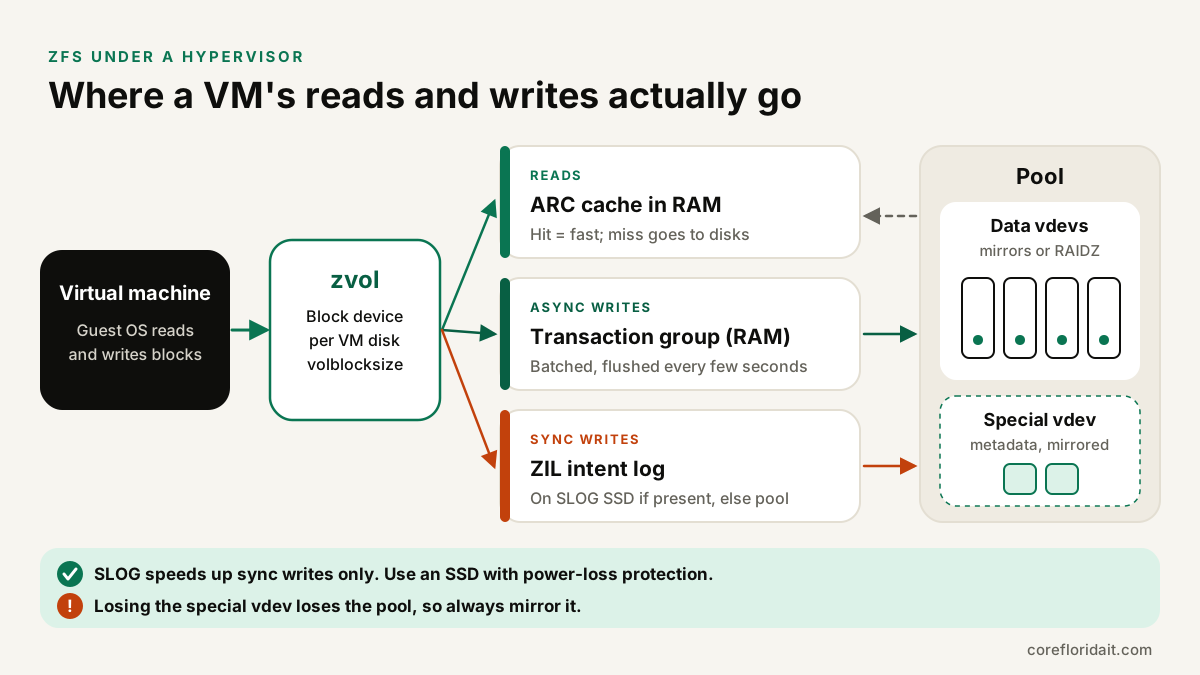
- ZIL and SLOG. Asynchronous writes are collected in RAM and committed to disk in transaction groups every few seconds. Synchronous writes (databases, NFS, iSCSI, VMs configured with
sync=alwaysor certain cache modes) must be safe on stable storage before ZFS acknowledges them, so they go to the ZFS Intent Log (ZIL) first. By default the ZIL lives on the pool disks. A SLOG is a separate, fast device that holds the ZIL. It only speeds up sync writes; for async workloads it does nothing, and it is not a general write cache. A SLOG must have power-loss protection (PLP) so data acknowledged as safe really survives a power cut. - Special vdev. Stores pool metadata and, optionally, small file blocks (
special_small_blocks) on fast SSDs, which helps HDD pools. Unlike L2ARC or SLOG, the special vdev is part of the pool: if it fails without redundancy, the pool is lost. Always mirror it, and match the pool's redundancy level.
## Mirrored SLOG (PLP NVMe) for a pool with heavy sync writes
zpool add tank log mirror /dev/disk/by-id/nvme-PLP_1 /dev/disk/by-id/nvme-PLP_2

## Mirrored special vdev for an HDD pool's metadata
zpool add tank special mirror /dev/disk/by-id/ssd-S1 /dev/disk/by-id/ssd-S2
Never set sync=disabled on VM storage to "speed things up": it acknowledges writes that are not yet safe, and a power failure can corrupt guest file systems and databases.
Snapshots are not backups
ZFS snapshots are instant and cheap, which makes them perfect before an update or a risky change. They live on the same pool, so they don't protect against pool loss, controller failure, theft, fire, flooding or an attacker with admin rights deleting both data and snapshots. Real protection means separate copies:
- Proxmox Backup Server on separate hardware, with deduplication and verification jobs;
- an off-site or cloud copy that a compromised hypervisor admin cannot delete;
- the 3-2-1 backup rule, tested with periodic restores.
For South Florida offices, keep at least one copy outside the hurricane-risk building and know how you would restore it remotely.
Scrubs and SMART monitoring
A scrub reads every block in the pool and verifies checksums, repairing anything bad from redundancy. Debian/Proxmox ships a scheduled monthly scrub in /etc/cron.d/zfsutils-linux; confirm it exists or add your own:
## Check health, errors and last scrub result
zpool status -v
zpool list -o name,size,alloc,free,cap,health

## Example cron (/etc/cron.d/zfs-scrub): scrub every Sunday at 02:00
0 2 * * 0 root /usr/sbin/zpool scrub vmpool
Pair scrubs with SMART monitoring (smartmontools) so failing drives are replaced before a second one fails, and make sure the ZFS event daemon (ZED) and the Proxmox notification system actually send alerts to a monitored mailbox:
smartctl -a /dev/nvme0
## Enable alerts in /etc/zfs/zed.d/zed.rc, e.g. ZED_EMAIL_ADDR="[email protected]"
Replication between Proxmox nodes
Proxmox storage replication (pvesr) uses ZFS send/receive to copy VM disks to another node on a schedule (every 15 minutes by default). If the primary node fails, you can start the VM on the replica with only the changes since the last sync lost, which is far faster than a full restore. Requirements and notes:
- ZFS storage with the same storage ID on both nodes, in a Proxmox cluster.
- Replication is asynchronous: it complements backups and does not replace them.
- With high availability enabled, a failover restarts the VM from the last replicated state.
- Size the link: the first sync copies the whole disk, then only changes.
## Replicate VM 101 to node pve2 every 15 minutes
pvesr create-local-job 101-0 pve2 --schedule "*/15"
pvesr status
Common mistakes
- Hardware RAID under ZFS. ZFS needs direct access to each disk to detect and repair errors. Use an HBA in IT/pass-through mode, not a RAID volume.
- Consumer SSDs without PLP. They can lose acknowledged writes on power loss and wear out quickly under VM write patterns. Choose enterprise or data-center SSDs, especially for SLOG and special vdevs.
- Filling the pool. ZFS is copy-on-write and needs free space to write efficiently. As a planning guideline, start expanding well before the pool gets close to full, and set alerts on capacity.
- Wrong ashift. Letting a drive report 512-byte sectors and creating
ashift=9vdevs. - Using /dev/sdX names. They can change on reboot; use
/dev/disk/by-id/. - RAIDZ1 with large hard drives for important VMs.
- Unmirrored special vdev, or a SLOG added in the belief it caches all writes.
- No scrubs, no SMART alerts, no off-host backups.
FAQ
Should I use mirrors or RAIDZ for Proxmox VMs?
Use striped mirrors for VM disks and databases because random I/O scales with the number of vdevs. Use RAIDZ2 for backup storage and bulk data where capacity matters more than IOPS.
Do I need a SLOG?
Only if your workload issues many synchronous writes (databases, NFS or iSCSI shares, VMs with sync-heavy settings) and the pool disks are slower than the SLOG device. For most all-NVMe pools, a SLOG adds little.
How much RAM does ZFS need?
ZFS works with modest RAM; more RAM simply means a larger read cache. On a hypervisor, cap the ARC so VMs have what they need, then tune using arc_summary hit rates.
Is ZFS replication enough to protect my data?
No. Replication protects against a node failure with a short gap, but it copies deletions, corruption from inside the guest and ransomware encryption too. Keep versioned backups on separate systems.
Get your storage designed right
Core Florida IT designs and supports Proxmox clusters with ZFS for businesses in Miami, Broward and across South Florida, and manages hosts remotely nationwide: hardware selection, pool layout, replication, monitoring and server setup and repair. Moving off VMware? See our VMware to Proxmox migration guide. Request a free IT assessment and Max and the team will review your current storage before you buy anything.