Proxmox Security Hardening Checklist: Network, Host, Access, VMs and Backups
A layered Proxmox VE hardening checklist with real commands and config: keep port 8006 off the internet, enforce 2FA, scope roles and tokens, segment VLANs, enable the firewall and lock down backups.
Proxmox security hardening comes down to five layers: keep the management interface off the internet, lock down the host, control who can do what, isolate virtual machines from each other, and protect backups so an attacker cannot erase your way back. This checklist walks through each layer with the Proxmox VE settings and commands we use when we build or audit a cluster.
Key takeaways
- Never expose port 8006 or SSH to the internet. Reach management through a VPN or a Zero Trust access service.
- Turn on two-factor authentication (TOTP or WebAuthn) for
root@pamand every administrator, and stop using root for daily work. - Use roles, groups and API tokens with privilege separation so each person and integration gets only what it needs.
- Separate management, cluster (corosync), storage and VM traffic onto their own VLANs, and enable the Proxmox firewall at datacenter, host and VM level.
- Back up to Proxmox Backup Server with client-side encryption, verification jobs and an offsite copy that production credentials cannot delete.
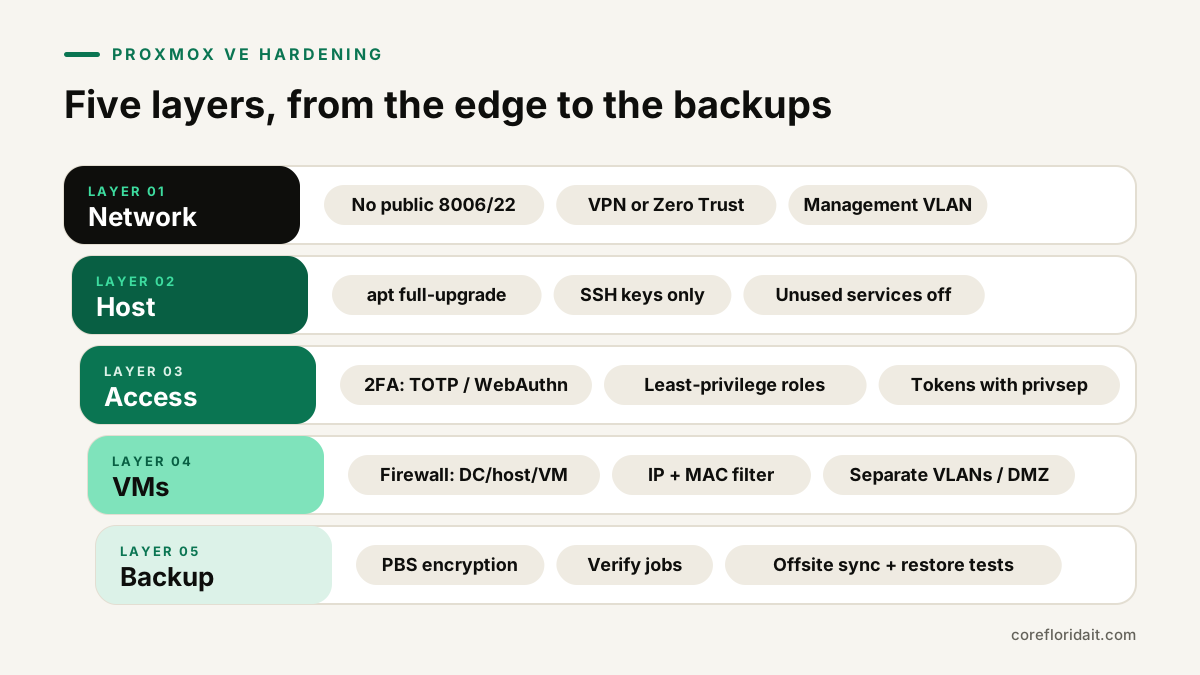
Layer 1: Network. Keep management private
The Proxmox web interface (TCP 8006) and SSH are administrative surfaces. They belong on a management network that only administrators can reach.
- No port forwards to 8006, 22 or 3128 on your firewall. Check from outside your network that nothing answers.
- Remote administration through a VPN (WireGuard, IPsec, your firewall's VPN) or a Zero Trust access service with its own identity checks and MFA in front of the interface.
- Dedicated management VLAN. The host's management IP lives on a VLAN that user workstations and guest Wi-Fi cannot route to.
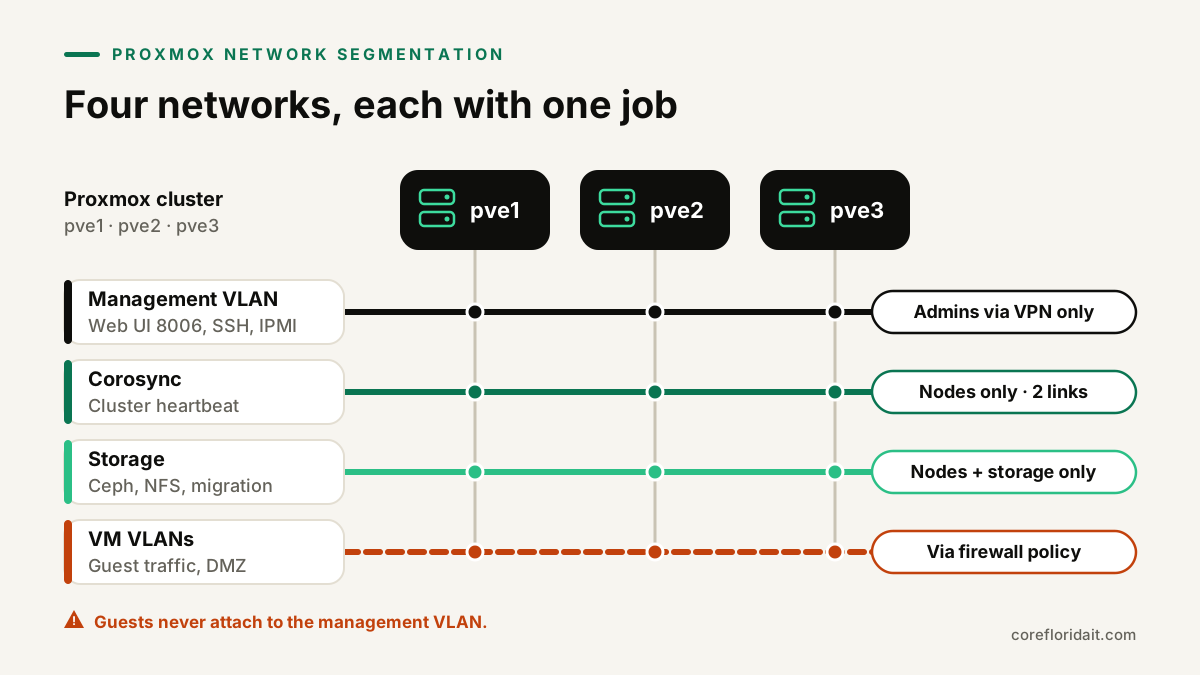
A typical segmentation plan for a small cluster:
| Network | Carries | Who should reach it |
|---|---|---|
| Management VLAN | Web UI (8006), SSH, API, IPMI/iDRAC/iLO | Admin workstations, VPN users |
| Corosync (cluster) | Cluster heartbeat and configuration sync | Proxmox nodes only, ideally a dedicated link plus a redundant one |
| Storage | Ceph, NFS, iSCSI, replication, migration | Proxmox nodes and storage only |
| VM VLANs | Guest traffic, split by role (servers, DMZ, lab) | Users and services per your firewall policy |
Corosync is latency-sensitive and should not share a saturated link with storage or backups; the Proxmox Cluster Manager documentation recommends a separate network for it. Out-of-band management interfaces (iDRAC, iLO, IPMI) deserve the same protection as the hypervisor itself.
Layer 2: Host. Patch, trim and harden SSH
Keep Proxmox updated
Configure the correct repository for your licence: the enterprise repository with a subscription, or the no-subscription repository otherwise. Never mix in random Debian testing sources. Update with a full upgrade, not a plain apt upgrade, which can leave Proxmox packages in an inconsistent state:
apt update
apt full-upgrade
pveversion -v
pveupgrade is the Proxmox wrapper that runs the same upgrade and tells you when a reboot is needed for a new kernel. On a cluster, upgrade one node at a time after migrating its VMs, and read the release notes before major version upgrades.
SSH: keys only
Create a drop-in file such as /etc/ssh/sshd_config.d/hardening.conf:
PasswordAuthentication no
KbdInteractiveAuthentication no
PermitRootLogin prohibit-password
MaxAuthTries 3
Then validate and reload:
sshd -t && systemctl reload ssh
Keep PermitRootLogin prohibit-password rather than no on clusters: Proxmox nodes use root SSH keys to talk to each other for migration and some cluster tasks. Restrict SSH at the firewall to the management network instead.
Disable what you do not use
List what is listening and question each port:
ss -tulpn
Examples: if you never use NFS, rpcbind (port 111) does not need to listen on public interfaces; if nobody uses SPICE consoles, spiceproxy (3128) can be firewalled. Change these deliberately, one at a time, and confirm the cluster still behaves. Do not install desktop environments, web servers or unrelated software on the hypervisor.
Layer 3: Access. 2FA, least privilege and tokens
Two-factor authentication
Under Datacenter > Permissions > Two Factor, add TOTP or WebAuthn (security keys, passkeys) for root@pam and every admin account, and generate recovery keys stored in your password manager. WebAuthn needs the interface reached through a consistent hostname with a valid certificate, so set that up first.
Named accounts and roles
Root is for emergencies. Give each person a named account in the Proxmox VE realm (@pve) or your directory (LDAP/AD/OpenID Connect realm), place them in groups, and grant built-in roles on the narrowest path:
pveum group add vm-operators
pveum user add maria@pve --groups vm-operators
pveum acl modify /pool/accounting --groups vm-operators --roles PVEVMUser
pveum acl modify / --groups vm-operators --roles PVEAuditor
Useful built-in roles: PVEAuditor (read-only), PVEVMUser (console, power, backup of assigned VMs), PVEVMAdmin, PVEDatastoreUser. Resource pools make it easy to scope permissions to a set of VMs and storage.
API tokens with privilege separation
Monitoring, automation and backup tools should use API tokens, never a user password:
pveum user add monitoring@pve
pveum user token add monitoring@pve grafana --privsep 1
pveum acl modify / --tokens 'monitoring@pve!grafana' --roles PVEAuditor
With --privsep 1 the token gets only the permissions you grant it explicitly, not everything its user can do. Set an expiry where practical, and revoke tokens when a tool is retired.
Audit what happens
- Datacenter > Tasks and each node's task log show who started, stopped, migrated or deleted what.
- The API and web access log is at
/var/log/pveproxy/access.log; SSH and PAM events are in the journal (journalctl -u ssh). - Forward logs to a central syslog or SIEM so a compromised host cannot quietly erase its own history.
- Configure Datacenter > Notifications (SMTP, sendmail, Gotify or webhook targets) so failed backups, replication errors and fencing events reach a person.
Layer 4: VMs. Isolate guests
The Proxmox firewall at three levels
The Proxmox firewall works at datacenter (/etc/pve/firewall/cluster.fw), host (/etc/pve/nodes/<node>/host.fw) and VM/container level (/etc/pve/firewall/<vmid>.fw). Start at the datacenter with a default-deny inbound policy and an explicit management IP set:
[OPTIONS]
enable: 1
policy_in: DROP

[IPSET management]
10.10.10.0/24

[RULES]
IN ACCEPT -source +management -p tcp -dport 8006
IN ACCEPT -source +management -p tcp -dport 22
The management IP set has a special meaning: Proxmox automatically allows the web UI, SSH and cluster-related access from it. Before you enable a DROP policy, confirm your own address is in that set and keep console or IPMI access available, or you can lock yourself out.
At VM level, enable the firewall on the VM's network interface (firewall=1) and in the VM's firewall options, then allow only the ports that service needs. Turn on the IP filter option and MAC filter to stop a guest from spoofing addresses.
More isolation habits
- Never attach guest NICs to the management bridge or VLAN.
- Put internet-facing services in their own VLAN (a DMZ) and firewall them from internal servers.
- Prefer unprivileged containers; use VMs for anything untrusted or exposed.
- Keep the QEMU guest agent and guest operating systems patched; the hypervisor does not protect a vulnerable guest from the internet.
- Limit who can open consoles: console access to a VM is often equivalent to administrator access inside it.
Layer 5: Backups. Encrypted, verified and out of reach
Ransomware operators look for the backup system first. With Proxmox Backup Server:
- Client-side encryption. Add the PBS storage in Proxmox VE with an encryption key; data is encrypted before it leaves the host. Store the key (and its paper or password-manager copy) away from the cluster; without it backups cannot be restored.
- Least-privilege backup user. The account Proxmox VE uses on PBS should have
DatastoreBackup, which can create backups but not prune old ones, so a compromised hypervisor cannot wipe history. - Verification jobs on the datastore to re-read chunks and detect corruption, plus scheduled prune and garbage collection.
- Offsite copy. A second PBS, pulling via a sync job from its own side, with credentials the primary site does not hold. That copy also covers hurricane-season risks for offices in Miami-Dade and Broward.
- Restore tests. Restore a VM to an isolated network on a schedule and document the result. A 3-2-1 strategy is only real when restores work.
Quick audit checklist
| Check | Done when |
|---|---|
| 8006/22 not reachable from internet | External scan shows closed |
| 2FA on root@pam and all admins | Every admin has TOTP or WebAuthn plus recovery keys |
| Named accounts, no shared root | Root used only for emergencies |
| Tokens use privilege separation | Each token has explicit, minimal ACLs |
| Firewall enabled with default deny | Datacenter, host and VM rules reviewed |
| Management, corosync, storage, VM VLANs separated | Guests cannot route to the management network |
| Updates applied with full upgrade | Nodes on the current point release |
| PBS encryption, verify jobs, offsite sync | Last restore test documented |
| Notifications configured | A failed job reaches a person |
Common mistakes
- Port-forwarding 8006 "temporarily" and forgetting about it.
- Enabling the firewall with a DROP policy before adding the management IP set.
- Running daily administration as
root@pamwithout 2FA. - API tokens without privilege separation for monitoring tools.
- Backups on the same storage and credentials as production.
- Running corosync over the same busy link as storage and backups.
FAQ
Is the Proxmox firewall enough on its own?
No. It is excellent for host and VM rules, but it complements, not replaces, a perimeter firewall, VLAN segmentation and access through a VPN or Zero Trust service.
Do we need the enterprise repository?
The enterprise repository receives updates after more testing and comes with a subscription; the no-subscription repository is fine for many small businesses but gets packages earlier. Either way, the important part is that updates are applied regularly.
Can we disable root SSH completely?
Not on a cluster without breaking node-to-node operations. Use key-only root login, restrict SSH to the management network and use named accounts for people.
Does this apply after a VMware migration?
Yes. If you are coming from ESXi, follow our VMware to Proxmox migration guide and treat hardening as part of the project, not a later phase.
Core Florida IT designs, migrates and hardens Proxmox clusters for businesses across Miami, Doral and South Florida, with remote support nationwide. See our Proxmox virtualization service, or request a free IT assessment and we will review your current cluster against this checklist.