Proxmox High Availability Cluster for Small Business: Quorum, Storage and Failover
How to build a Proxmox VE HA cluster a small business can trust: quorum and QDevice, choosing Ceph, ZFS replication or a NAS, separate Corosync networks, watchdog fencing and real failover tests.
A Proxmox high availability cluster lets a small business keep virtual machines running when a server fails: the remaining nodes detect the failure, fence the dead node and restart its workloads automatically. To do it safely you need three votes for quorum (three nodes, or two nodes plus a QDevice), shared or replicated storage, a dedicated Corosync network and working fencing. HA reduces downtime; it never replaces backups.
Key takeaways
- Plan for three nodes. Two nodes can work only with an external QDevice to break ties.
- Choose storage deliberately: Ceph for shared storage with no data loss on failover, ZFS replication for simple and fast local storage with a small replication gap, or an external NAS/SAN over NFS or iSCSI.
- Give Corosync its own network (ideally two links). Storage traffic on the same link is a classic cause of unexpected fencing.
- Test failover by pulling power, not just by clicking shutdown, and keep backups on Proxmox Backup Server.
When does a small business need Proxmox HA?
Not every business needs a cluster. If a few hours of downtime while you restore from backup is acceptable, a single well-built host with good backups may be the right answer. HA earns its place when downtime is expensive: a Doral logistics firm whose dispatch system must run around the clock, a medical practice whose EHR gateway and phones run on-premises, or a Fort Lauderdale accounting firm in the middle of tax season.
If you are coming from VMware, see our Proxmox vs VMware comparison and the VMware to Proxmox migration guide first. The HA concepts are similar, but storage and networking choices are more explicit in Proxmox VE.
Architecture: what a small Proxmox HA cluster looks like
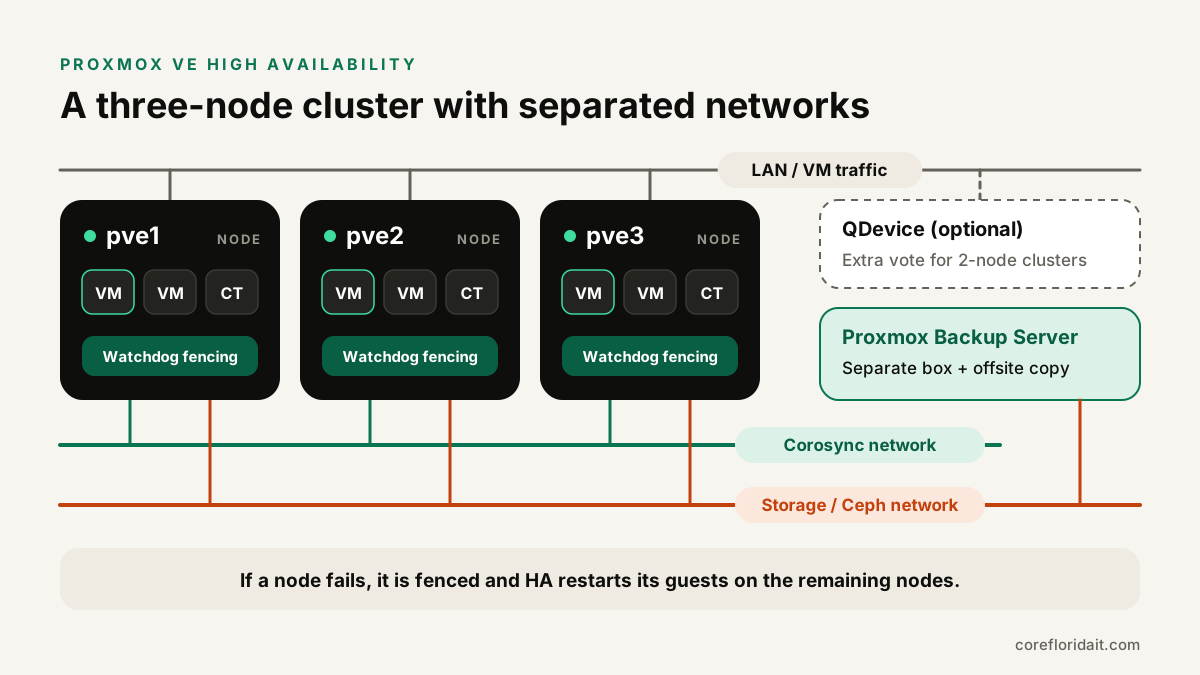
A typical design for a small business:
- Three similar nodes with the same CPU generation (or a common virtual CPU type) so live migration works between them.
- Three networks: the client LAN for VM traffic, a dedicated Corosync network for cluster communication, and a storage network for Ceph or replication traffic.
- Shared or replicated storage so a VM's disk is available on the node that takes over.
- A watchdog on every node for fencing.
- Proxmox Backup Server on separate hardware, with a copy offsite.
Quorum and Corosync: why three votes matter
Proxmox VE uses Corosync to keep cluster membership and configuration consistent. A cluster only makes changes, and HA only recovers workloads, when a majority of votes (quorum) is present. With three nodes, any two can keep running if one fails. With two nodes, losing one leaves a single vote, which is not a majority, so nothing recovers.
Creating a cluster with two redundant Corosync links looks like this:
pvecm create corecluster --link0 10.10.10.11 --link1 10.20.20.11   # on pve1

pvecm add 10.10.10.11 --link0 10.10.10.12 --link1 10.20.20.12   # on pve2 and pve3 (join through pve1)
pvecm add 10.10.10.11 --link0 10.10.10.13 --link1 10.20.20.13

pvecm status
Two nodes? Add a QDevice
If you only have two servers, add an external QDevice: a small Linux machine or VM outside the cluster running corosync-qnetd, which provides a tie-breaking vote.
apt install corosync-qnetd   # on the external QDevice host

apt install corosync-qdevice   # on every cluster node

pvecm qdevice setup 10.10.10.50   # on one cluster node
Proxmox recommends a QDevice for clusters with an even number of nodes, not odd ones. Never host the QDevice as a VM on the cluster it is supposed to arbitrate.
Network rules for Corosync
Corosync needs low and stable latency more than bandwidth. Put link0 on a dedicated NIC and switch (or VLAN on dedicated ports), and link1 on a different physical path. If backup, Ceph or migration traffic saturates the Corosync link, nodes can lose contact, lose quorum and fence themselves even though nothing is actually broken.
Shared storage options: Ceph vs ZFS replication vs NAS/iSCSI
For HA to restart a VM on another node, that node must be able to reach the VM's disk. You have three practical options.
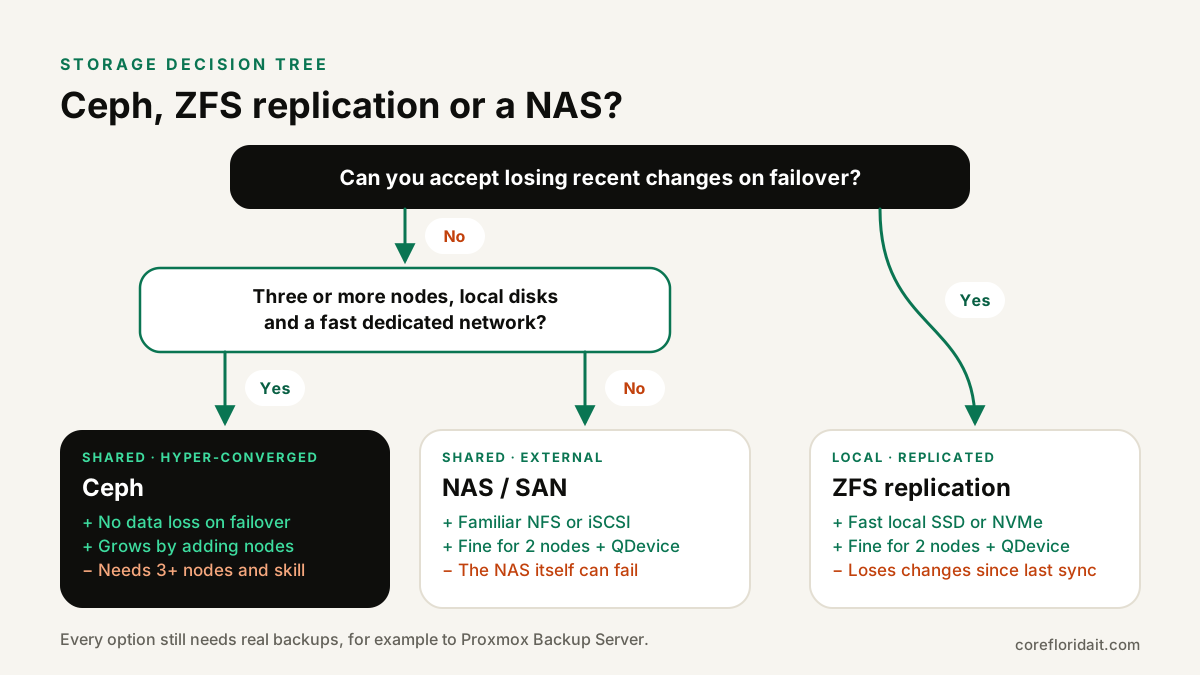
| Ceph (hyper-converged) | ZFS replication | NAS/SAN (NFS or iSCSI) | |
|---|---|---|---|
| Data on failover | Shared, no loss of committed writes | Changes since the last replication run are lost | Shared, no loss |
| Minimum nodes | Three (more is better) | Two plus QDevice | Two plus QDevice |
| Network | Fast dedicated storage network (10 GbE or faster recommended) | Replication traffic, modest needs | Dedicated storage network |
| Single point of failure | None if sized correctly | None | The storage box itself, unless it is redundant |
| Skills required | Highest: monitoring OSDs, placement groups, recovery | Moderate | Moderate, depends on the vendor |
| Best for | Growing clusters that need true shared storage | Small clusters where a short data gap is acceptable | Firms that already own a reliable storage array |
Ceph
Proxmox VE integrates Ceph management directly. A basic setup:
pveceph install
pveceph init --network 10.30.30.0/24
pveceph mon create          # on each of the three nodes
pveceph osd create /dev/nvme0n1   # per data disk, per node
pveceph pool create vmpool --add_storages
Use enterprise SSDs or NVMe with power-loss protection, keep the default of three replicas for VM pools and leave enough free capacity for Ceph to re-replicate data after a disk or node failure.
ZFS replication
Each node keeps VMs on local ZFS, and Proxmox replicates snapshots to another node on a schedule. If a node fails, HA starts the VM from the latest replica, so you lose only what changed since the last run. The storage must have the same name on every node.
pvesr create-local-job 100-0 pve2 --schedule "*/15"   # replicate VM 100 to pve2 every 15 minutes
pvesr status
NAS or SAN
An external array over NFS or iSCSI is familiar and easy to understand, but make sure the array itself is redundant (dual controllers, redundant power and network) or it becomes the one failure that takes everything down.
Fencing and the watchdog
Fencing guarantees that a failed or isolated node has really stopped before its VMs start elsewhere; otherwise two copies of the same VM could write to the same disk and corrupt it. Proxmox VE uses self-fencing with a watchdog: a node that loses quorum stops refreshing its watchdog and is reset, and the other nodes wait long enough to be sure before recovering its services.
By default Proxmox uses the Linux software watchdog (softdog). If your servers have a supported hardware watchdog such as IPMI, you can enable it:
WATCHDOG_MODULE=ipmi_watchdog # /etc/default/pve-ha-manager
Reboot after the change and confirm the module loaded.
HA resources, groups and live migration
Add the VMs that matter to HA. Not every VM needs it; test systems and non-critical tools can stay manual.
ha-manager add vm:100 --state started --max_restart 1 --max_relocate 1
ha-manager status
Use HA groups (in Proxmox VE 8) or HA rules (in Proxmox VE 9, which replaces groups with node and resource affinity rules) to control where services prefer to run, for example keeping two domain controllers on different nodes. Also set the datacenter shutdown policy (for example migrate) so planned maintenance moves VMs away instead of stopping them.
For maintenance, live migration moves a running VM between nodes without downtime:
qm migrate 100 pve2 --online
qm migrate 100 pve2 --online --with-local-disks   # with local ZFS disks and replication
Test failover before you trust it
A cluster that has never failed over in a test will surprise you in production. Schedule a maintenance window and:
- Live-migrate each HA VM to every node and back.
- Pull the power on one node (not a clean shutdown) and watch HA fence it and restart its VMs elsewhere.
- Disconnect one Corosync link and confirm the cluster keeps quorum on the second link.
- Fail a disk (or mark a Ceph OSD out) and confirm storage recovers.
- Restore a VM from backup to prove the last line of defense works.
Document how long each step took and what users noticed. That becomes your runbook.
HA is not backup
High availability protects you from hardware failure. It does not protect you from ransomware, a deleted folder, a bad update or a flooded server room: all of those are replicated or shared right along with your good data. Keep scheduled backups to Proxmox Backup Server on separate hardware, sync a copy offsite, and test restores. In South Florida, plan for hurricane season too: an HA cluster in a single ground-floor closet is still a single site.
Common mistakes
- Two nodes without a QDevice, which cannot recover anything when one fails.
- Corosync on the same congested link as storage and backups.
- Consumer SSDs in Ceph, which can be slow and wear out quickly under replication writes.
- Mixed CPU generations with the host CPU type, which breaks live migration.
- HA on everything, including VMs that should never auto-start elsewhere.
- No backups because "we have HA".
FAQ
How many nodes do I need for Proxmox high availability?
Three is the recommended minimum. Two nodes can work with an external QDevice that provides a third vote, but you need shared or replicated storage either way.
Is Ceph overkill for a small business?
Not always, but it needs three or more nodes, suitable disks, a fast dedicated network and someone who can monitor it. For many small clusters, ZFS replication or a reliable NAS is simpler and good enough.
Will users notice when a node fails?
With HA, VMs on the failed node are restarted on another node after fencing, so users see a short outage similar to a reboot, not a seamless handover. Live migration for planned maintenance is the case with no visible downtime.
Do I need a Proxmox subscription for HA?
HA is included in Proxmox VE without a subscription. A subscription gives access to the enterprise repository and vendor support, which many businesses choose for production.
Planning a Proxmox cluster or moving off VMware? Our Proxmox virtualization services and server setup and repair teams design, build and test HA clusters for businesses in Miami-Dade, Broward and nationwide. Request a free IT assessment and we will review your workloads and recommend the right cluster and storage design.