Private AI on Premises: Running a Local LLM for Your Small Business
Keep confidential prompts and documents on hardware you control. A practical guide to local LLMs: model servers, GPU memory and quantization, security, Proxmox GPU passthrough and the cloud-vs-local decision.
Private AI on premises means running an open-weight language model on a server you control, so prompts, documents and answers never leave your network. For a small business it makes sense when the data is confidential, the tasks are well defined and someone can keep the system patched; for open-ended writing and complex reasoning, a cloud AI API under a business contract is usually still the stronger tool. This guide explains how a local LLM works, how to size the hardware without guesswork and how to secure it properly.
Key takeaways
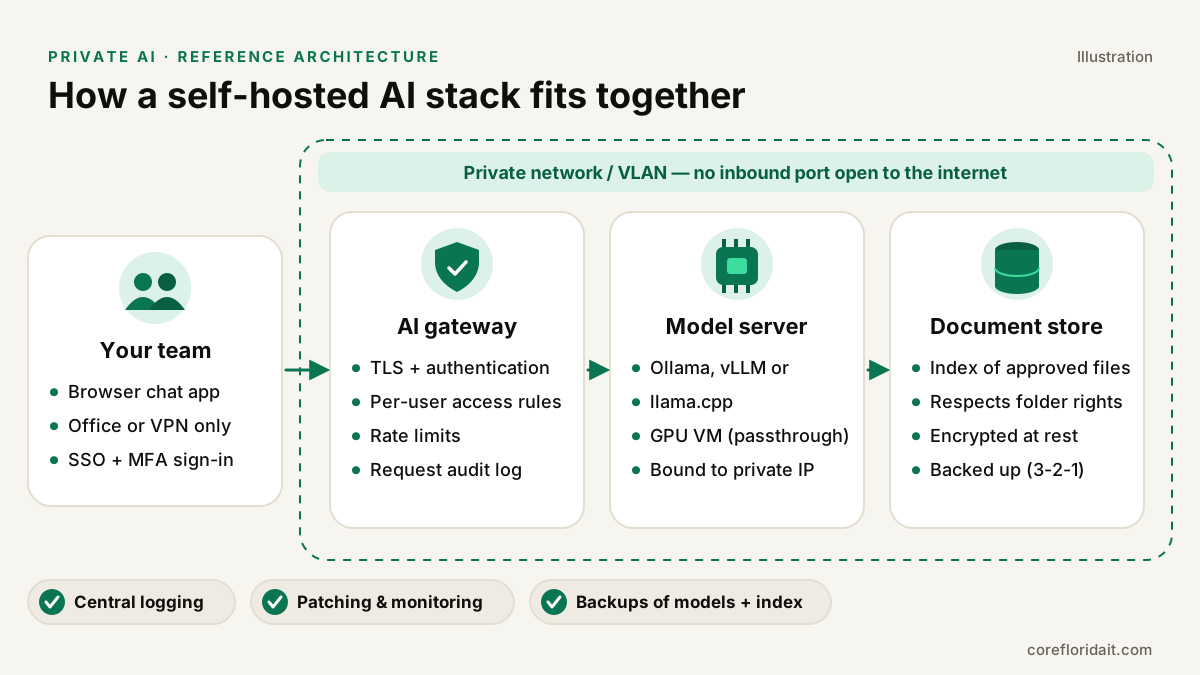
- A local LLM stack has four parts: an authenticated gateway, a model server (Ollama, vLLM or llama.cpp), a GPU with enough memory, and a permission-aware document store.
- GPU memory (VRAM) is the main sizing constraint. Model size, quantization level and context length decide what fits.
- "Local" is not automatically "secure": the default model APIs have little or no authentication and must never be exposed to the internet.
- Many firms end up hybrid: private models for confidential documents, a vetted cloud service for everything else.
- On Proxmox, GPU passthrough lets you run the AI server as a VM with snapshots, backups and isolation like any other workload.
What "private AI" actually means
When staff paste a contract into a public chatbot, the text travels to a third party and is handled under that provider's terms. Business plans from major AI vendors offer meaningful protections (no training on your data, retention controls), and for many tasks that is enough. Private AI goes one step further: the model weights are downloaded once and run on your own hardware, in your office rack or in a dedicated server you control. The prompt, the retrieved documents and the generated answer stay inside your network boundary.
This is possible because of open-weight models: models whose trained parameters are published for download under a license (families such as Llama, Mistral, Qwen and Gemma are common examples). Each license has its own terms for commercial use, so read it before you deploy.
The building blocks of a local LLM stack
Model servers: Ollama, vLLM and llama.cpp
| Tool | What it is good at | Typical fit |
|---|---|---|
| llama.cpp | Efficient C/C++ inference engine; runs quantized GGUF models on GPU, CPU or both | Small servers, mixed CPU/GPU hardware, maximum control |
| Ollama | Friendly tool (originally built on llama.cpp) that downloads and serves models with one command and an HTTP API | Pilots, single-team deployments, quick evaluation |
| vLLM | High-throughput server with an OpenAI-compatible API, efficient memory management and request batching | Many concurrent users, production APIs on dedicated GPUs |
All three expose an HTTP API that a chat front end, a document assistant or your own business application can call.
The gateway
Put a gateway in front of the model server: a reverse proxy or AI gateway that terminates TLS, requires single sign-on with MFA, enforces per-user or per-group access, rate-limits requests and writes an audit log. Never let laptops talk to the model port directly.
The document store (retrieval)
Most business value comes from retrieval-augmented generation (RAG): the system searches your approved documents, passes the relevant passages to the model and asks it to answer from them. The critical design rule is that retrieval must respect existing permissions. If an associate cannot open a partner-only folder in the file server, the AI must not be able to quote from it either.
Sizing the hardware: VRAM, quantization and context
You do not need a data center, but you do need to understand one constraint: the model has to fit in GPU memory to run at a useful speed.
- Parameters. A model's size is described in billions of parameters. More parameters generally means better answers and more memory.
- Quantization. Weights are normally stored at 16 bits each. Quantization stores them with fewer bits (8, 5 or 4), shrinking memory needs roughly in proportion, with a modest quality loss that grows as you go lower. Think of it as a high-quality compressed photo: for most business tasks the difference is hard to see at 8 or 5 bits, more noticeable at aggressive levels.
- Rough rule of thumb. Memory for the weights is about parameters × bytes per parameter: at 16-bit, two bytes per parameter; at 8-bit, about one; at 4-bit, about half a byte. Then add headroom.
- Context and concurrency. Every active conversation needs a KV cache that grows with context length (how much text the model reads at once) and with the number of simultaneous users. Long contracts and many users need extra VRAM beyond the weights.
Practical sizing approach:
- Pick two or three candidate models for your real tasks (summarizing engagement letters, drafting first responses, extracting fields from invoices).
- Test them on a workstation or a short-term GPU instance with your documents, not marketing benchmarks.
- Choose the smallest model and the mildest quantization that meets the quality bar, then size VRAM for that model plus context for your expected concurrent users.
- Leave room to grow: models improve quickly and you will want to swap them.
CPU-only inference works for experiments and low-volume batch jobs, but interactive use by a team needs a GPU. Plan for power and cooling too: a GPU server in a small Brickell or Doral office closet can overheat it, and a UPS sized for the load is mandatory in South Florida's storm season.
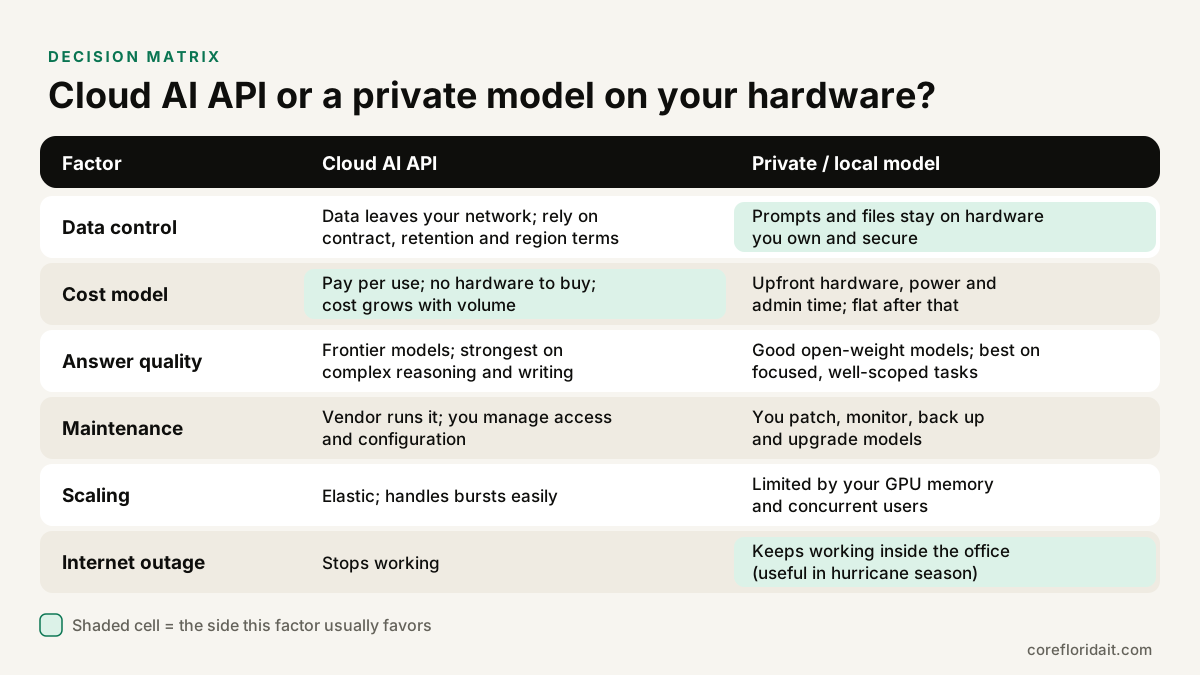
Cloud AI API or local model? A decision matrix
| Factor | Cloud AI API (business plan) | Private model on your hardware |
|---|---|---|
| Data control | Leaves your network; governed by contract, retention and region settings | Stays on hardware you own and secure |
| Cost model | Pay per use, no hardware; grows with volume | Upfront hardware, power and admin time; predictable afterwards |
| Answer quality | Frontier models, strongest on complex reasoning and writing | Good open-weight models, best on focused, well-scoped tasks |
| Maintenance | Vendor operates it; you manage access | You patch, monitor, back up and upgrade |
| Scaling | Elastic | Limited by GPU memory and concurrency |
| Internet outage | Stops working | Keeps working inside the office |
Local tends to win when documents are highly confidential, the workload is steady and repetitive, or you need to keep working offline. Cloud tends to win when quality on hard problems matters most, usage is occasional, or nobody can own the maintenance. A hybrid design, with a router that sends confidential matters to the local model and general tasks to a cloud service, is often the most practical answer.
Use cases for Miami law, CPA and healthcare firms
- Law firms. Summarizing deposition transcripts, building first-draft chronologies, searching prior work product. The Florida Bar's ethics guidance on generative AI (Opinion 24-1) stresses confidentiality, competence and supervision; a private deployment helps with the first, but lawyers still review every output. See our page on IT support for law firms.
- CPA firms. Extracting fields from source documents, drafting client emails from engagement notes, answering staff questions against the firm's own procedures manual. Tax data is exactly the kind of information you want to keep in-house; see IT support for CPA firms.
- Healthcare practices. Drafting patient-letter templates or summarizing internal policies. Running locally does not by itself make a system HIPAA compliant: you still need risk analysis, access controls, audit logs and safeguards described in the Security Rule. Our healthcare IT team designs those controls.
- Bilingual teams. Many open-weight models handle English and Spanish well, which is useful for firms in Doral, Hialeah or Kendall serving clients in both languages. Test the Spanish output with native speakers before rolling it out.
Securing a local LLM
Self-hosting moves the security responsibility to you. Treat the AI server like any other server holding client files.
- No exposed endpoints. Bind model servers to localhost or a private VLAN IP. Ollama listens on 127.0.0.1 by default; changing
OLLAMA_HOSTto0.0.0.0without a firewall exposes an API with no authentication. Scan your public IPs to confirm nothing answers. - Authenticate everything. Users sign in through SSO with MFA (passkeys are ideal; see passkeys for business). Service-to-service calls use API keys or mTLS; vLLM supports an API key option, but it does not replace a gateway.
- Least privilege for retrieval. Index only approved sources and enforce document permissions at query time.
- Logging with care. Log who asked, when and which documents were retrieved. Decide deliberately whether to store full prompts: logs of confidential prompts become confidential data with their own retention rules.
- Prompt injection awareness. A malicious document can contain instructions aimed at the model. Do not give the model tools that send email, delete files or move money without a human approval step. The OWASP Top 10 for LLM applications is a good checklist.
- Supply chain. Download models and containers from official sources, verify checksums, pin versions and review licenses.
- Patching and backups. Keep drivers, the model server and the OS updated; back up configuration, the vector index and your chosen model files using the 3-2-1 rule.
A simple, safe starting configuration for Ollama on a private network looks like this:
## /etc/systemd/system/ollama.service.d/override.conf
[Service]
## Listen only on the server's private VLAN address, never 0.0.0.0
Environment="OLLAMA_HOST=10.20.30.15:11434"

## Firewall: allow only the gateway host to reach the model port
ufw default deny incoming
ufw allow from 10.20.30.10 to any port 11434 proto tcp
ufw enable
Pair it with a written AI use policy so staff know which tool to use for which data.
Running it as a VM: GPU passthrough on Proxmox
If you already run Proxmox virtualization, the AI server can be a VM like any other. With PCI passthrough, Proxmox hands a physical GPU directly to one VM, so the guest's driver controls the card at near-native performance while you keep VM-level snapshots, backups and isolation.
High-level steps (see the Proxmox wiki for detail):
- Enable IOMMU in the BIOS/UEFI (Intel VT-d or AMD-Vi) and on the kernel command line.
- Load the VFIO modules and confirm the GPU sits in its own IOMMU group.
- Blacklist the host GPU driver or bind the card to
vfio-pciso the host does not claim it. - Create the VM with the q35 machine type and OVMF (UEFI), then add the GPU as a PCI device.
- Install the vendor driver inside the guest and verify the card is visible before installing the model server.
## Proxmox host: confirm IOMMU is active and find the GPU's group
dmesg | grep -e DMAR -e IOMMU
for d in /sys/kernel/iommu_groups/*/devices/*; do
  echo "group $(basename $(dirname $(dirname $d))): $(lspci -nns ${d##*/})"
done
A passed-through GPU belongs to one VM at a time, and a VM with a physical device attached cannot live-migrate. Plan maintenance windows accordingly and keep a documented rebuild procedure; our Proxmox Backup Server guide covers the backup side.
Common mistakes
- Opening the model port to the internet "just for testing".
- Choosing the biggest model you can download instead of the smallest one that does the job.
- Indexing the entire file share, including HR and partner-only folders.
- Assuming local equals compliant, without risk analysis or audit logging.
- Giving the model write actions (email, file deletion) with no human approval.
- No UPS, no cooling plan, no backups of the index and configuration.
FAQ
Is a local LLM as good as the big cloud models?
Usually not on open-ended reasoning and long-form writing, where frontier cloud models lead. For focused tasks such as summarizing, extracting and answering from your own documents, a well-chosen open-weight model is often good enough. Test with your real data before deciding.
Do we need a dedicated GPU server?
For a pilot, a workstation-class GPU may be enough. For a team using it daily, plan a server with a data-center or workstation GPU, proper cooling and a UPS, or a GPU VM on an existing Proxmox host.
Does private AI make us HIPAA or Bar-rule compliant?
No single tool does. It removes one risk (sending data to a third party) but you still need access controls, audit logs, policies, training and professional review of outputs.
Can we start in the cloud and move local later?
Yes. If your applications call an OpenAI-compatible API, switching the back end from a cloud service to vLLM or Ollama is mostly configuration, which keeps your options open.
Plan your private AI with Core Florida IT
Core Florida IT designs private and hybrid AI for professional firms in Miami, Broward and across South Florida, and supports remote teams nationwide: hardware sizing, Proxmox GPU passthrough, secure gateways, retrieval with permissions and staff training. Max and the team will review your use cases and data with you before recommending any hardware. Request a free IT assessment or book a Zoom call to get started.