AI Pilot Plan for Small Business: 90 Days to a Measurable ROI
A practical 90-day plan to test AI on one business workflow, measure the baseline yourself, calculate ROI in hours and make a clear go, adjust or stop decision.

A good AI pilot for a small business takes 90 days, focuses on one repetitive workflow and ends with a clear go, adjust or stop decision. You measure how the work performs today, change one thing, and then compare the results in hours, errors and turnaround time, not in impressions. This guide gives you the plan, the ROI formula and a worked example you can copy.
Key takeaways
- Pilot one workflow with a clear owner, not "AI for the whole company".
- Measure your own baseline first: minutes per task, error and rework rate, turnaround. Without it, ROI is guesswork.
- Write success criteria before you choose a tool, and check what data the tool will see.
- Count the hidden hours: setup, training, human review and weekly check-ins.
- Day 90 ends with a written decision: scale, extend with changes, or stop and archive what you learned.
Why most AI pilots never reach a decision
Many small firms in Miami try AI the same way: someone signs up for a tool, a few people use it, enthusiasm fades and nobody can say whether it helped. The problem is rarely the technology. It is the lack of a baseline, a scope and a deadline. A pilot is an experiment, and experiments need a starting measurement, a single variable and a date when you read the results.
The 90-day window works well for small and mid-sized businesses because it is long enough to get past the learning curve and short enough that the team stays focused. It also fits naturally around busy seasons: a CPA firm in Coral Gables should not run a pilot during tax season, and a logistics company in Doral may want to finish before peak shipping months.
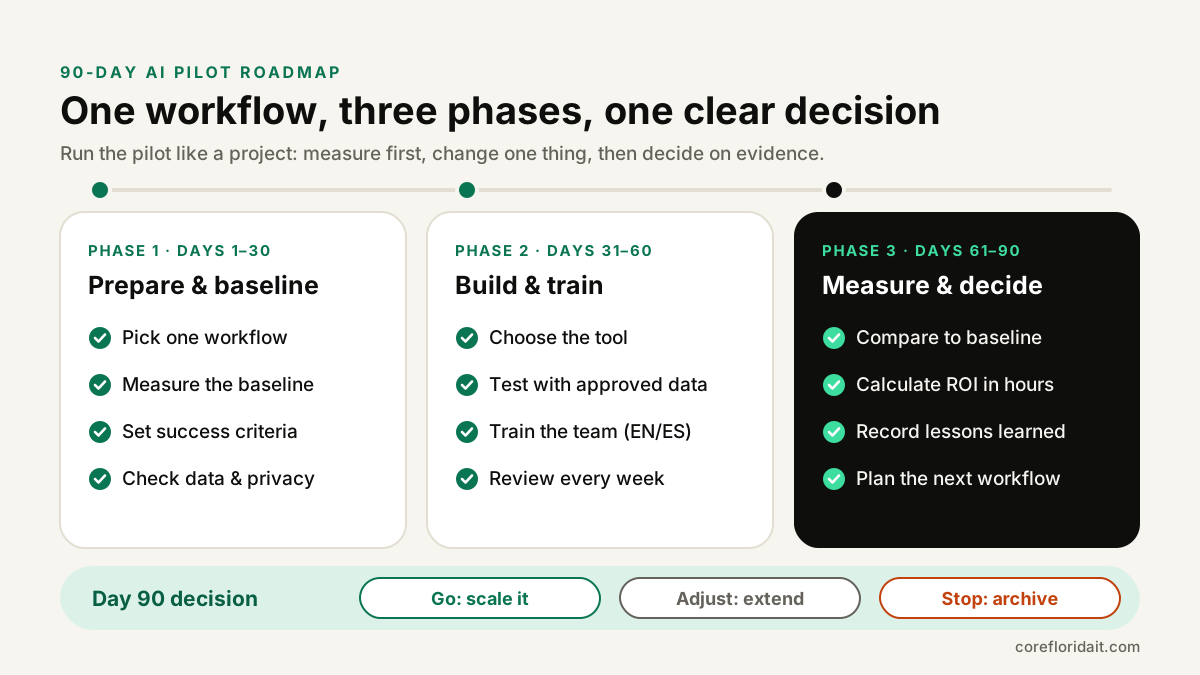
Phase 1 (days 1–30): pick one workflow and measure it
Choose the right workflow
The best first candidate is repetitive, text-heavy, frequent and low-risk if a draft is wrong, because a person still reviews it. Good examples:
- Summarizing inbound emails and routing them to the right person.
- Drafting first replies to common client questions in English and Spanish.
- Extracting fields from invoices, intake forms or bills of lading into a spreadsheet.
- Turning meeting notes into action items and follow-up emails.
- Preparing first drafts of proposals from an approved template.
Avoid, for a first pilot, anything where a wrong answer has legal, financial or medical consequences without a reliable human check: final tax advice, legal conclusions, clinical decisions or payment approvals.
Measure the baseline yourself
Do not borrow numbers from vendor marketing. For two weeks, measure the workflow as it is today. Keep it simple:
| Metric | How to measure it | Where the data comes from |
|---|---|---|
| Minutes per task | Time 20–30 real examples with a stopwatch or time tracker | The people doing the work |
| Volume | Count tasks per week | Inbox, ticket system, forms |
| Error / rework rate | How many outputs needed correction | Reviewer notes, a simple log |
| Turnaround | Time from request to done | Ticket or email timestamps |
| Satisfaction | Short 1–5 rating from staff (optional) | A two-question form |
Write the results in a shared sheet. This sheet becomes the pilot scorecard.
Write success criteria before choosing a tool
Agree on what "worth it" means while nobody is attached to a product. For example: "Average handling time drops meaningfully, error rate does not get worse, and staff would choose to keep using it." Add at least one guardrail: a condition that stops the pilot regardless of time saved, such as client data appearing where it should not.
Check data and privacy
List exactly what information the workflow touches. Client names and emails? Social Security numbers, bank details, health information? Then check the tool's data terms: whether your inputs are used for training, where data is stored, how long it is retained and whether business plans offer admin controls. Florida's data breach law (§ 501.171, Florida Statutes) defines personal information broadly, and regulated firms have extra duties: healthcare practices under HIPAA, CPA firms under the FTC Safeguards Rule. If your team has no written rules yet, start with our guide on how to write an AI use policy for employees and AI and data privacy.
Phase 2 (days 31–60): choose the tool, build and train
Off-the-shelf or custom?
| Option | Best when | Watch out for |
|---|---|---|
| AI features already in your suite (email, documents, CRM) | The workflow lives inside one app you already pay for | Limited control over prompts and data flow |
| Standalone business AI assistant | Drafting, summarizing, research across many tasks | Copy-paste habits, data leaving approved systems |
| Light automation (connectors, no-code flows) | Moving data between two or three systems | Fragile steps, permissions sprawl |
| Custom app built on an AI API | A specific, high-volume workflow with your own rules | Needs ownership, testing and maintenance |
Start with the simplest option that can meet your success criteria. A custom build makes sense when the workflow is frequent, well defined and needs your own rules, approvals or integrations. That is the kind of work we do in AI business apps.
Test with approved data
Run the tool on the same kinds of examples you timed in Phase 1. Use real but approved data, or anonymized copies. Keep a log of every output that needed correction and why: missing information, wrong tone, invented details, wrong language. Those notes improve prompts and templates faster than anything else.
Train the team, in both languages
In South Florida, many teams work in English and Spanish in the same day. Train on both: show how the tool handles Spanish client emails, where it makes mistakes with names, addresses or formal register (usted vs. tú), and when to switch languages explicitly. A one-hour hands-on session with real examples beats a long slide deck. Cover three rules: what data may go in, how to review an output, and how to report a problem. Our AI training sessions follow that format.
Hold a short weekly review
Every week, the workflow owner reviews the scorecard for 30 minutes: volume handled, time per task, corrections and any incidents. Decide one small change for the next week. Do not change three things at once, or you will not know what worked.
Phase 3 (days 61–90): measure, calculate ROI and decide
Repeat the Phase 1 measurement on a similar sample of tasks with the same method. Then calculate the return in hours.
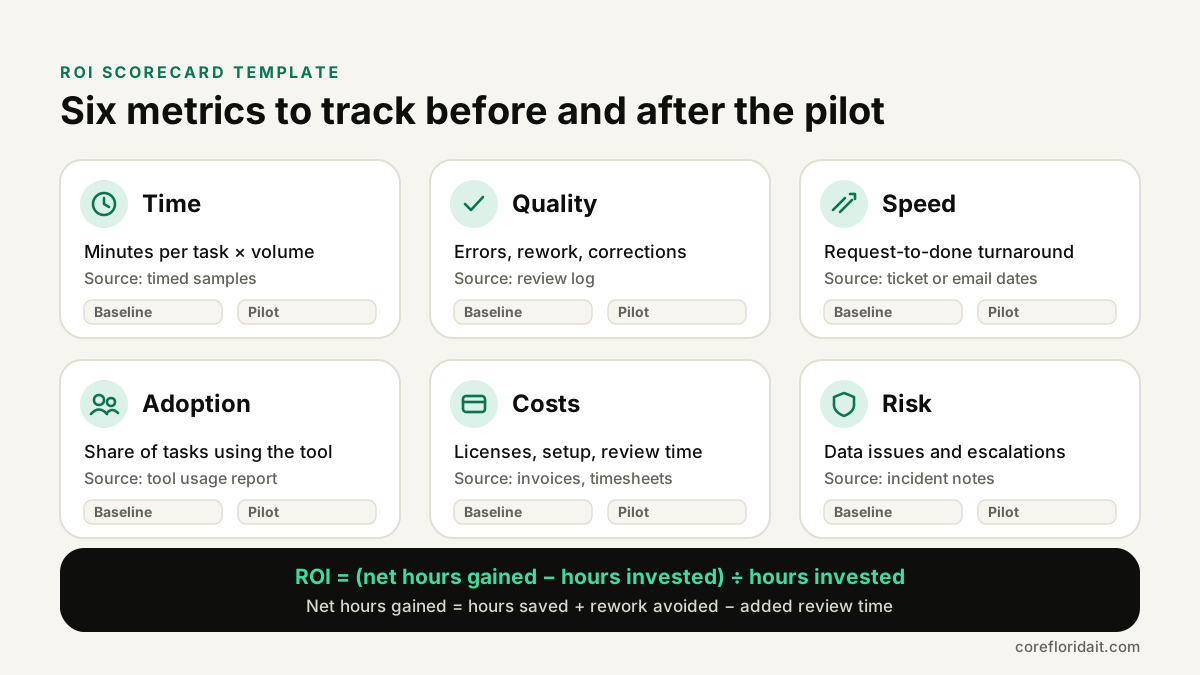
The ROI formula (in hours)
Using hours keeps the math honest and avoids arguing about prices. If you want a financial figure later, multiply by your own internal hourly cost.
Hours saved      = (T_before - T_after) x V x W / 60
Review hours     = R x V x W / 60
Rework avoided   = (E_before - E_after) x M x W / 60
Net hours gained = Hours saved + Rework avoided - Review hours

Hours invested   = setup + training + weekly reviews + tool cost converted to hours
ROI              = (Net hours gained - Hours invested) / Hours invested

T = hands-on minutes per task       V = tasks per week
R = review minutes per task         W = weeks measured
E = tasks needing rework per week   M = minutes to fix one rework
To convert subscription costs to hours, divide the cost for the period by your internal loaded hourly cost. That keeps every term in the same unit.
A worked example with hypothetical numbers
The numbers below are invented for the arithmetic only. Use your own measurements.
- T_before = 18 minutes, T_after = 6 minutes, R = 4 minutes of review per task.
- V = 100 tasks per week, W = 8 weeks of live use.
- E_before = 5 reworks per week, E_after = 3, M = 15 minutes each.
Hours saved = (18 − 6) × 100 × 8 / 60 = 160 hours. Review hours = 4 × 100 × 8 / 60 ≈ 53 hours. Rework avoided = (5 − 3) × 15 × 8 / 60 = 4 hours. Net hours gained ≈ 160 + 4 − 53 = 111 hours.
Hours invested: 30 hours of setup, 12 hours of training (six people, two hours each), 18 hours of weekly reviews, plus the subscription converted to hours, which for this example we call 20 hours. Total = 80 hours.
ROI = (111 − 80) / 80 ≈ 0.39. In plain terms, in this hypothetical pilot the workflow gave back every hour invested plus a bit more, and most of the setup hours will not repeat. That is a reasonable "go". If the ratio had been negative, the next question would be whether review time can drop safely or whether the workflow was the wrong choice.
Read beyond the ratio
A positive ROI with a worse error rate is not a success. Check every category on the scorecard: did turnaround improve, did quality hold, did staff actually use it, and were there any data incidents? Adoption matters: a tool that saves time for one enthusiastic person is not yet a process.
The day-90 decision and how to scale
Write a one-page decision memo:
- Go: results met the criteria. Document the final prompts, templates, review step and data rules, then pick the next workflow.
- Adjust: promising but not there yet. Extend by 30 days with one specific change.
- Stop: criteria not met or a guardrail triggered. Archive what you learned; it still has value.
When scaling, keep the same discipline: one new workflow at a time, a baseline for each, and an owner who reviews the numbers. Add access controls and logging as usage grows, and review your vendor's terms whenever plans change.
Common mistakes
- No baseline. Without "before" numbers, every result is an opinion.
- Measuring only time saved. Review time and rework can quietly eat the gains.
- Too many workflows at once. You cannot tell what worked.
- Ignoring the Spanish side. Bilingual teams need bilingual testing.
- Skipping the data check. Pasting client records into an unapproved tool creates risk you then have to undo.
- No end date. Pilots without a decision date drift into permanent half-adoption.
FAQ
How many people should be in an AI pilot?
Enough to represent the workflow: usually the people who do the task every week plus one reviewer and the workflow owner. In a small firm that may be three to six people.
Can we run the pilot with free AI tools?
You can test ideas, but for client or employee data use business plans with admin controls and clear data terms. Free consumer accounts often lack those controls.
What if the ROI is positive but the team does not like the tool?
Treat low adoption as a real result. Find out why: extra steps, poor Spanish output, slow interface. Fix one cause in an "adjust" period, or stop.
Should we hire someone to build a custom AI app right away?
Usually not. Prove the workflow with the simplest tool first. Custom development makes sense once you know the volume, the rules and the ROI.
Plan your pilot with us
Core Florida IT helps businesses in Miami-Dade, Broward and across the US choose the right workflow, set up the measurement and build or configure the tool safely. Prefer to talk it through on video? Book a Zoom assessment. Or request a free IT assessment and we will map your first 90-day AI pilot with you.