IT Disaster Recovery Plan for Hurricane Season: A South Florida Business Guide
A checklist says what to do; a disaster recovery plan says why, in what order and who decides. Build recovery tiers, offsite immutable backups, a bilingual call tree and test it before June 1.

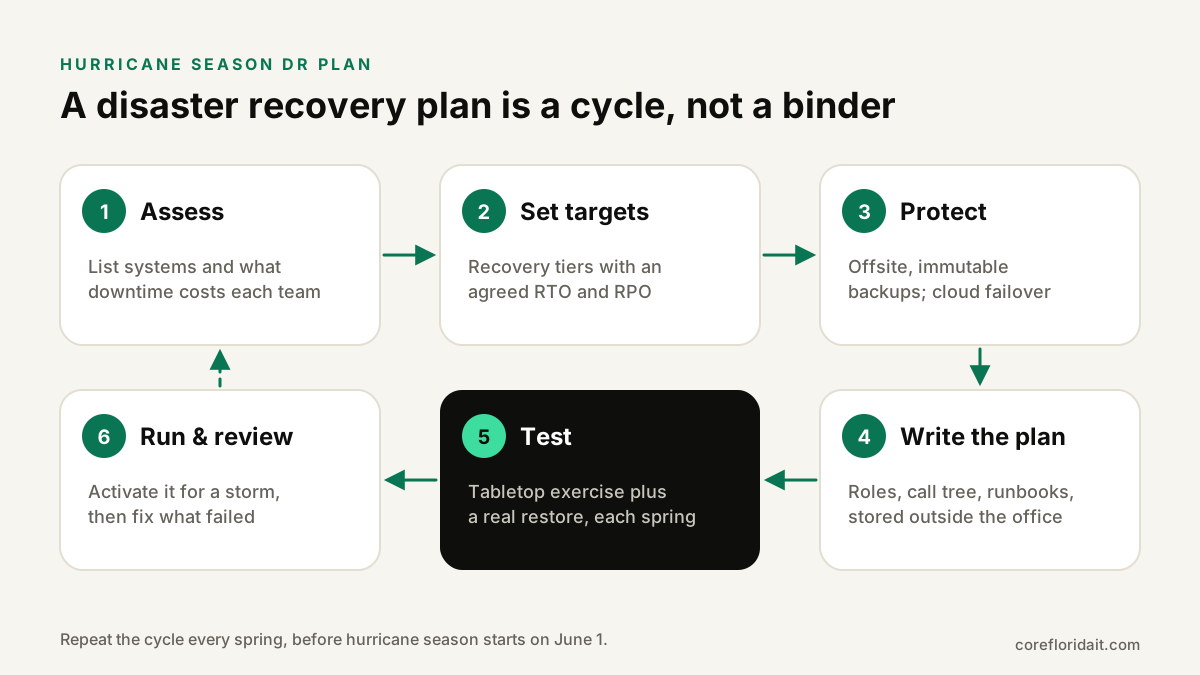
An IT disaster recovery plan for hurricane season is a written document that tells your team, before any storm forms, which systems matter most, how fast each must come back, where the backups live, who makes decisions and how everyone communicates. For a South Florida business it should rest on recovery tiers with agreed RTO and RPO targets, offsite and immutable backups, a cloud failover option and a bilingual call tree, and it should be tested every spring with a tabletop exercise and a real restore.
Key takeaways
- A checklist tells people what to do; a disaster recovery (DR) plan tells them why, in what order and who decides. You need both.
- Build the plan around recovery tiers, each with a recovery time objective (RTO) and recovery point objective (RPO) agreed with the business owner.
- Backups only count if they are offsite, immutable and recently restored in a test.
- Name roles and alternates, and keep the plan, contacts and admin credentials reachable without the office or company email.
- Test it every year before June 1, and expect disaster-themed scams once the storm passes.
Checklist vs. plan: why you need a written DR plan
If you already use our hurricane season IT preparedness checklist, you have the tasks for the days around a storm. A disaster recovery plan sits above that checklist. It captures the decisions you cannot make well under pressure: which systems come back first, how much data loss is tolerable, when to fail over to the cloud, who can approve emergency spending and how to reach staff who have evacuated.
South Florida storms combine problems that rarely happen together elsewhere: long power outages, flooding in ground-floor offices and server closets, internet providers down for days, roads closed around Doral warehouses or Fort Lauderdale offices, and staff caring for their own families. The plan must assume the office, the local grid and your usual go-to people may all be unavailable at once. The same discipline also protects you from ransomware and hardware failure, so the effort pays off all year.
What goes into the plan document
Keep the document short enough that people will actually read it. A practical structure for a small or mid-sized business:
| Section | What it contains |
|---|---|
| 1. Scope and activation | Which sites and systems are covered; who can declare a disaster and when (for example, when a hurricane watch covers your county) |
| 2. Roles and alternates | Incident lead, IT lead, communications lead, finance approver, each with a named backup person |
| 3. System inventory and tiers | Every critical system, its owner, its tier, its RTO and RPO |
| 4. Backup and replication map | What is backed up, where, how often, how it is protected from deletion and how to restore it |
| 5. Failover procedures | Step-by-step runbooks to bring systems up in the cloud or a secondary site |
| 6. Communication plan | Bilingual call tree, templates, status channel, client and vendor contacts |
| 7. Vendor and contract list | Internet providers, cloud vendors, insurers, IT provider, with account numbers and support paths |
| 8. Return to normal | How to fail back, verify data and close the incident |
| 9. Testing and maintenance log | Dates of exercises, findings and fixes |
Store copies in at least two places that do not depend on your office: a secure cloud location and an encrypted offline copy with the incident lead and alternate. A plan that lives only on the file server you are trying to restore is a classic mistake.
Recovery tiers, RTO and RPO
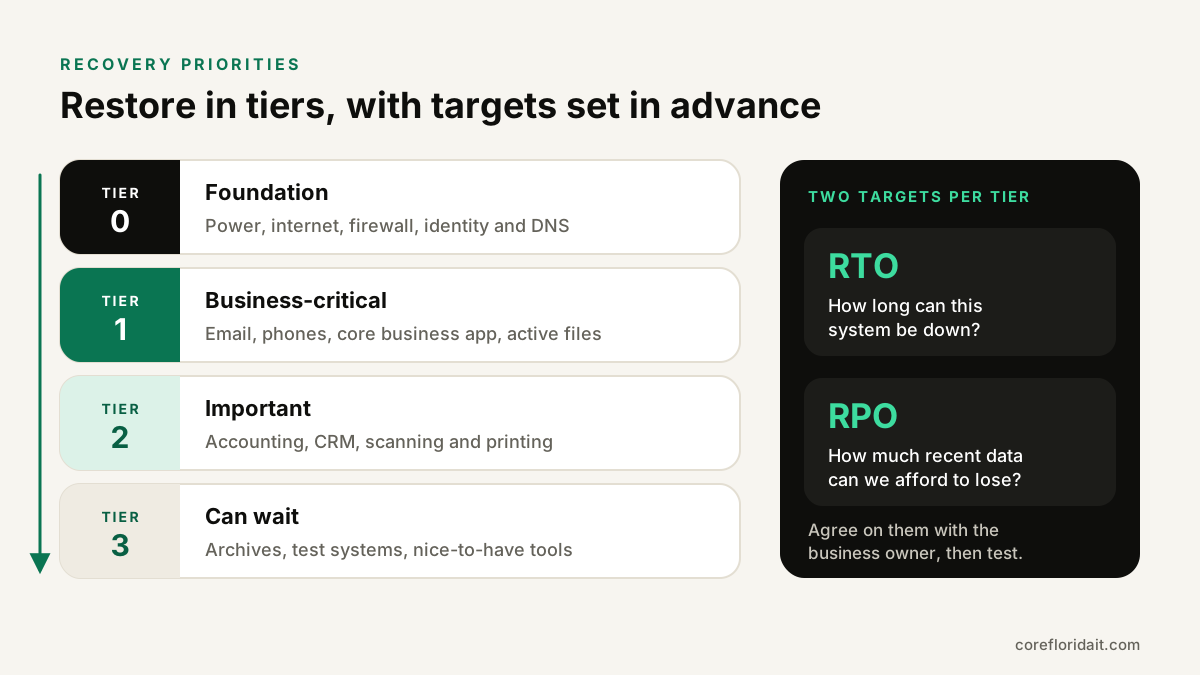
Restoring everything at once is slower than restoring in order. Sit down with each business owner before the season and agree on recovery tiers. Give each tier two targets:
- RTO (recovery time objective): how long the system can be down before the impact is unacceptable.
- RPO (recovery point objective): how much recent data you can afford to lose, which determines how often you back up or replicate.
The right values depend on your business. A law firm facing court deadlines, a healthcare practice that must reach patient records and a logistics company with drivers waiting on dispatch will all choose differently. What matters is that the targets are written, agreed and achievable with the backups you actually have.
| Tier | Typical systems | Why this order |
|---|---|---|
| 0: Foundation | Power, internet, firewall, identity (Entra ID or Active Directory), DNS | Nothing else works without them |
| 1: Business-critical | Email, phones, the core business application, active client files | Revenue and client obligations depend on them |
| 2: Important | Accounting, CRM, scanning and printing | Needed within days, not hours |
| 3: Can wait | Archives, test systems, nice-to-have tools | Restore once the business is running |
If the RTO you need is shorter than your restore process can deliver, the plan has just shown you where to invest: replication, cloud failover or simpler architecture.
Backups and failover that survive the building
- Follow the 3-2-1 rule at minimum: three copies of data, on two different media, one offsite. Our 3-2-1 backup strategy guide covers the details.
- Make at least one copy immutable, using object-lock cloud storage or a backup server with locked retention, so neither criminals nor a hurried mistake can delete it. CISA's ransomware guidance recommends offline or immutable backups for the same reason.
- Keep a copy outside the region. A second office in the same flood zone is not really offsite.
- Move tier 1 services off the office where it makes sense: Microsoft 365 or Google Workspace, a cloud phone system and hosted business applications keep running when the office is dark.
- Prepare a failover target for on-premises servers. Replicating critical virtual machines to a cloud or dedicated server outside the storm zone lets you start them if the primary site goes down. Document the exact steps, DNS changes and who triggers the failover.
- Protect identity. MFA must not depend on an office desk phone or a single person's device, and break-glass admin accounts should be documented and secured.
Power protection (UPS units for clean shutdowns, surge protection, safe generator use by licensed professionals and never indoors), remote-work-ready laptops managed with Microsoft Intune, and photographed equipment inventories for insurance belong in the plan's appendices. Ask your insurance agent which records your policy requires.
Roles and the bilingual communication tree
Many Miami-Dade and Broward teams work in English and Spanish. Write the communication plan in both languages:
- Call tree: who calls whom, with personal phone numbers and personal email addresses, stored outside company systems.
- Status channel: one place for updates (a group chat, a status page or a text service) that does not depend on your email server.
- Templates: "office closed", "work remotely today", "systems restored", "do not trust payment change requests", each ready in English and Spanish.
- External contacts: clients who need notice, key vendors and your IT provider's emergency path.
Every role needs an alternate. Storms do not care that your office manager is the only person who knows the phone system password.
Test the plan: tabletop exercise and a real restore
An untested plan is a guess. Each spring, before the season starts on June 1, run two kinds of tests:
- Tabletop exercise (about an hour or two). Gather the incident lead, IT, communications and a business owner. Walk through a scenario: "A hurricane warning is issued for Miami-Dade on Wednesday afternoon. Thursday, the office loses power and the internet provider is down. Friday, the ground floor has water." At each step, ask who decides, what the plan says, and what is missing. Ready.gov's business resources include exercise materials you can adapt.
- Technical restore test. Restore a file share, a database and at least one full server or virtual machine from the offsite copy. Fail over one tier 1 service to the secondary environment if you have one. Measure how long it took and compare with your RTO.
Record findings in the maintenance log, assign owners and fix them before the season. Re-test after major changes: a new server, an office move, a new business application.
Activation: before, during and after (in brief)
The detailed task list lives in the preparedness checklist. In plan terms:
- Before: the incident lead declares activation when a watch is issued for your area (the National Hurricane Center issues watches when hurricane conditions are possible, typically about 48 hours ahead). Verify backups, run a quick restore test, send the bilingual plan, and shut down or fail over according to the tiers.
- During: work from cloud services and the failover environment, send scheduled status updates and make no unplanned changes. Nobody travels to the office to check on a server.
- After: safety first, then restore by tier, document damage for insurance and only fail back once the office has stable power and connectivity.
Post-storm scams: put them in the plan
Criminals follow the headlines. After storms, expect fake contractors, fake relief grants, phony insurance claims portals and invoices "from" known vendors with new bank details. Add these rules to your plan:
- Any change to payment details is confirmed by calling a known phone number, never one from the message.
- Contractors are verified before work starts; in Florida, licenses can be checked with the Department of Business and Professional Regulation.
- Staff report suspicious emails and texts to IT, especially those about relief funds or account problems.
Our cybersecurity services include phishing awareness training in English and Spanish that covers these disaster-themed lures.
Common mistakes
- A plan that is really just a backup schedule, with no tiers, roles or communication.
- Targets nobody agreed to, so IT restores in one order and the business expected another.
- Backups in the same building or flood zone as the servers.
- No alternates for key people.
- Never testing, then discovering a missing database, an expired credential or a lost encryption key.
- No offline copy of the plan, contacts and admin credentials.
FAQ
What is the difference between a disaster recovery plan and a business continuity plan?
A business continuity plan covers how the whole business keeps operating: people, facilities, suppliers and clients. The IT disaster recovery plan is the technology part of it, focused on restoring systems and data within agreed targets.
What is the difference between RTO and RPO?
RTO is how long a system can be down before the impact is unacceptable. RPO is how much recent data you can afford to lose, which sets how often you back up or replicate.
How often should we test our hurricane DR plan?
At least once a year, in the spring before June 1, with a tabletop exercise and a real restore test, and again after any significant change to your systems or offices.
Do healthcare and legal firms need anything extra?
Yes. Healthcare practices need contingency planning for electronic protected health information under the HIPAA Security Rule, and law and CPA firms must keep client data confidential during an evacuation. Our healthcare IT team builds plans around those requirements.
Don't wait for the next forecast cone. Request a free IT assessment and we will review your backups, recovery tiers and failover options and help you write and test a disaster recovery plan for your offices in Miami-Dade and Broward. Prefer to talk first? Book a short Zoom call.