EDR vs Antivirus: What Small Businesses Actually Need (and Who Watches the Alerts)
Antivirus blocks known files; EDR detects attack behavior and lets you isolate a device remotely. Here is how AV, EDR, MDR and XDR compare and what really matters.

EDR vs antivirus comes down to one difference: traditional antivirus tries to block known-bad files, while endpoint detection and response (EDR) records what happens on every device, spots attack behavior and lets someone isolate and fix a compromised machine remotely. MDR adds the missing piece many small businesses overlook: a team of people actually watching those alerts around the clock. For most firms with sensitive client data, EDR is now the baseline, and the real decision is who responds when it fires.
Key takeaways
- Antivirus answers "is this file known to be malicious?" EDR answers "is something on this device behaving like an attack, and what did it touch?"
- EDR is only as good as the person watching it. An alert at 2 a.m. on a Saturday needs someone to act.
- MDR (managed detection and response) puts human analysts behind the tool; XDR extends detection to email, identity and cloud apps.
- Microsoft Defender for Business and Defender for Endpoint are common choices for Microsoft 365 shops and deploy cleanly through Intune.
- Cyber-insurance applications frequently ask about EDR, MFA, backups and alert monitoring. Answer them precisely.
Antivirus, EDR, MDR and XDR in plain terms
Traditional antivirus (AV) scans files against signatures and heuristics and quarantines what it recognizes. It is still useful, but modern attacks often avoid dropping an obviously malicious file: criminals sign in with stolen credentials, abuse built-in tools like PowerShell or remote management software, and move quietly between machines. Nothing looks like "a virus".
EDR puts a sensor on each endpoint that continuously records process launches, file changes, network connections, registry edits and sign-ins, and sends that telemetry to a cloud console. Detection logic looks at sequences: a Word document spawning PowerShell that downloads a script and starts encrypting shares is an attack chain, even if each file is new. When something fires, an administrator can:
- Isolate the device from the network while keeping the management connection open.
- Kill processes, quarantine files and block indicators across all devices.
- Investigate a timeline of exactly what happened before and after the alert.
- Run automated investigation and remediation on supported platforms.
- Roll back changes where supported. Some products can restore files encrypted by ransomware using snapshots. This is product-specific and is never a substitute for real backups.
MDR is a service, not a product category: a security operations team monitors your EDR alerts 24/7, triages them, contains threats and tells you what happened. XDR (extended detection and response) correlates signals beyond endpoints, such as email, identities, cloud apps and sometimes firewalls, so an attack that starts with a phishing email and a risky sign-in is seen as one incident.
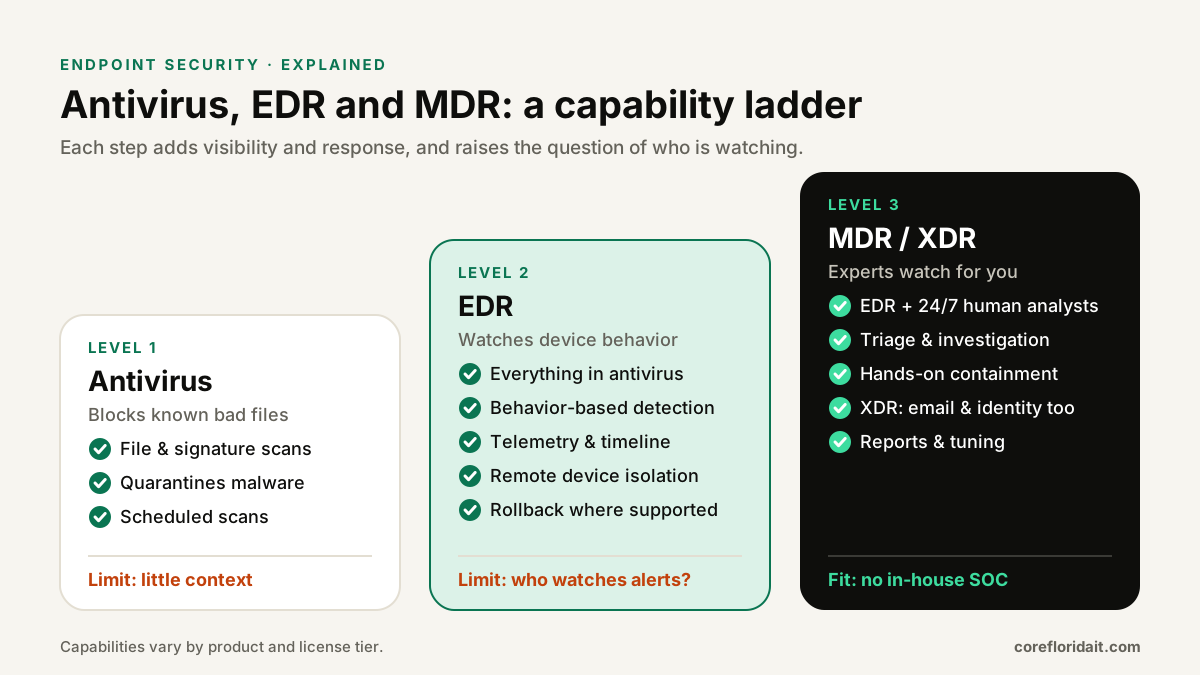
Side-by-side comparison
| Capability | Traditional antivirus | EDR | MDR / XDR service |
|---|---|---|---|
| Blocks known malware | Yes | Yes (includes next-gen AV) | Yes |
| Detects fileless and hands-on-keyboard attacks | Limited | Yes, behavior-based | Yes, plus human hunting |
| Device timeline for investigation | No | Yes | Yes, analyzed for you |
| Remote isolation of a device | No | Yes | Yes, often done by the provider |
| Ransomware rollback | No | Some products | Depends on the underlying EDR |
| Who watches alerts | You (if anyone) | You or your IT provider | Dedicated analysts, 24/7 |
| Email, identity, cloud signals | No | Endpoint only | XDR: yes |
| Tuning effort | Low | Moderate | Shared with the provider |
What EDR looks like with Microsoft Defender
For businesses already on Microsoft 365, Microsoft's endpoint stack is a natural example. Microsoft Defender for Business is aimed at small and medium businesses and is included in Microsoft 365 Business Premium; Defender for Endpoint Plan 1 and Plan 2 target larger or more demanding environments, with Plan 2 adding capabilities such as advanced hunting and extended data retention. Check Microsoft's current documentation for the exact feature split of the license you hold; it changes over time. We do not publish prices, and licensing should be compared on your actual seat count.
Key features to turn on, whichever tier you use:
- Tamper protection, so malware or a careless admin cannot switch Defender off.
- Attack surface reduction (ASR) rules, which block common attack techniques such as Office apps creating child processes or credential theft from LSASS. Start in audit mode.
- EDR in block mode, which lets Defender's EDR stop malicious artifacts even when another antivirus is primary.
- Automated investigation and response, set to a level of automation you are comfortable with.
- Device groups and alert notifications, so the right people hear about high-severity incidents.
Deploying through Intune
With Microsoft Intune, onboarding is policy-driven instead of machine-by-machine:
- Connect Defender for Endpoint to Intune in the Defender portal and enable the connector in Intune.
- Create an Endpoint security > Endpoint detection and response policy to onboard Windows and macOS devices.
- Create Antivirus and Attack surface reduction policies; deploy ASR rules in audit mode to a pilot group first.
- Use compliance policies with a device risk level so Conditional Access can block risky devices from Microsoft 365.
- Review the device inventory for machines that never onboarded, such as old laptops, a reception PC or a server.
To spot-check a Windows device:
<# Is Defender active, tamper-protected and up to date? #>
Get-MpComputerStatus | Select-Object AMRunningMode, RealTimeProtectionEnabled,
  IsTamperProtected, AntivirusSignatureLastUpdated

<# Is the Defender for Endpoint sensor (Sense) running? #>
Get-Service -Name Sense | Select-Object Status, StartType
AMRunningMode should read Normal (or EDR Block Mode / Passive Mode when another antivirus is primary). Servers need their own onboarding and licensing; do not assume a workstation plan covers them.
The question that matters most: who watches the alerts?
EDR generates alerts at any hour, and attackers know that weekends, holidays and the days around a hurricane are when nobody is looking. Before you buy, answer honestly:
- Who receives high-severity alerts at night and on weekends?
- Who is authorized to isolate the CFO's laptop or a production server?
- What happens if that person is on a plane or the office is closed for a storm?
- Where is the written incident procedure, and who has practiced it?
If the honest answer is "nobody after 6 p.m.", consider an MDR service or a managed IT provider that includes monitoring. The tool is half the solution; the other half is a person with authority and a plan.
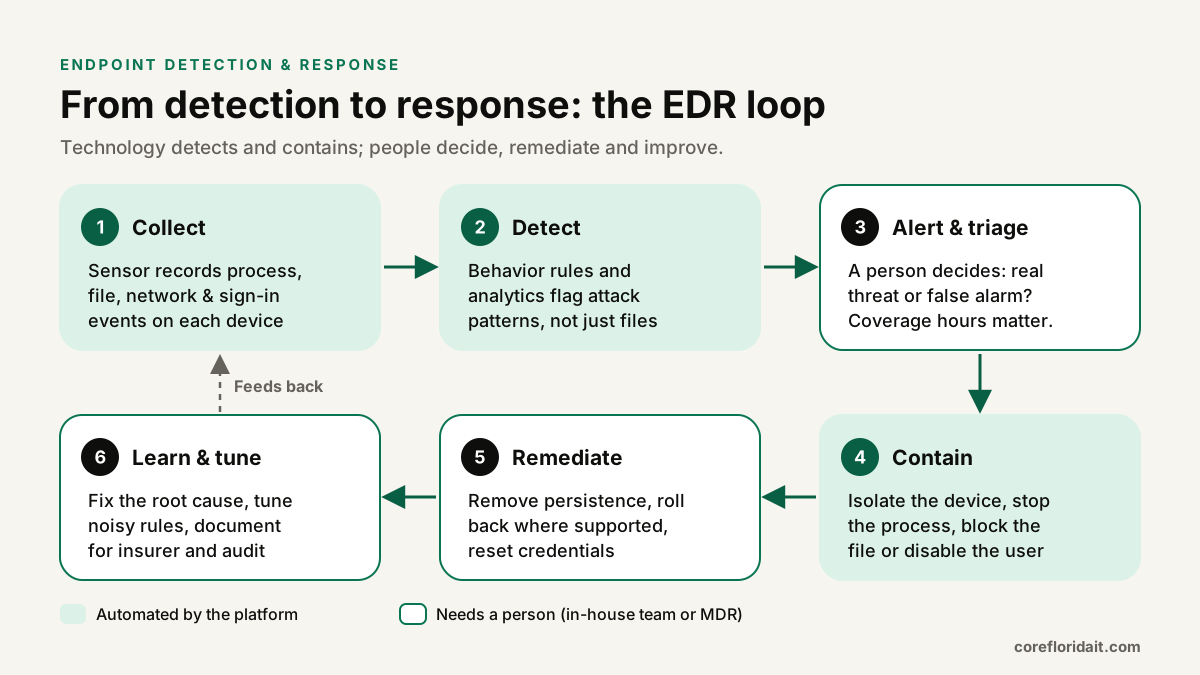
Tuning: making EDR useful instead of noisy
Every business has legitimate software that looks suspicious: accounting add-ins, legacy line-of-business apps, remote support tools, scripts your IT provider runs. Plan for a tuning period:
- Run ASR rules in audit mode for a few weeks and review what would have been blocked.
- Create narrow exclusions (specific file path and signer), never whole folders like
C:\or entire drives. - Document every exclusion with an owner and a review date.
- Disable or restrict remote access tools you do not use; attackers love them.
- Revisit alerts monthly and close the loop on root causes, not just individual events.
Cyber insurance: what carriers commonly ask
Questionnaires vary by carrier and change at every renewal, but questions about endpoint protection are common. You may be asked whether you run EDR on all endpoints and servers, whether it is monitored 24/7 and by whom, whether MFA protects email and remote access, and whether you keep backups that are offline or immutable. Answer precisely: if three laptops are not onboarded, say so and fix it. An inaccurate answer can create problems when a claim is filed. Ask your broker exactly what each question means, and pair EDR with a tested backup strategy and the steps in our ransomware prevention guide.
Common mistakes
- Running two full antivirus engines in active mode, which slows machines and causes conflicts.
- Leaving servers, kiosks or the "spare" laptop off the EDR console.
- Treating "installed" as "protected" without verifying sensors report in and policies apply.
- Excluding whole folders to silence noisy alerts.
- Nobody responsible after hours.
- Assuming rollback replaces backups. It does not.
For law firms, CPA practices and medical offices around Miami, Fort Lauderdale and Coral Gables, the same approach scales from five devices to a few hundred. Our cybersecurity and managed IT support services cover deployment, tuning and monitoring of EDR.
FAQ
Is Microsoft Defender Antivirus built into Windows enough?
The built-in antivirus is solid next-generation AV, but on its own it does not give you central EDR telemetry, remote isolation or investigation timelines. Those come with Defender for Business or Defender for Endpoint licensing and onboarding to the Defender portal.
Do we need MDR if we already have EDR?
You need someone who responds to EDR alerts at any hour. That can be your own trained team, a managed IT provider with monitoring, or an MDR service. If no one is assigned outside office hours, MDR fills that gap.
Can EDR stop ransomware?
EDR can detect and block many ransomware behaviors and contain an infected device quickly, and some products can roll back encrypted files. It does not guarantee prevention, so keep tested, offline or immutable backups and MFA on remote access.
Will EDR slow down our computers?
Modern EDR sensors are designed to be lightweight, but poorly planned deployments, such as two active antivirus engines or scanning large shared folders repeatedly, can affect performance. A pilot group and tuning period avoid most issues.
Not sure whether your current antivirus is enough, or whether anyone is watching the alerts? Request a free IT assessment and we will review your endpoint protection, Intune policies and monitoring coverage.