Cyber Insurance Requirements Checklist: The Security Controls Applications Commonly Ask About
MFA, EDR, immutable backups, patching, admin access, email security, training, incident response and vendor access: what insurers commonly ask, how to answer accurately and the evidence to keep.

Cyber insurance applications for small businesses commonly ask about a predictable set of security controls: multi-factor authentication, endpoint detection and response, backups you can actually restore, patching, privileged access, email security, training, an incident response plan and how vendors reach your systems. The best way to prepare is to put those controls in place, document them, and answer every question accurately, because an incorrect answer can create problems when you file a claim.
This article explains common technical questions from an IT perspective. It is not insurance or legal advice. Your broker, carrier and attorney are the authorities on what your policy requires and covers.
Key takeaways
- Applications vary by carrier, but the same core controls come up again and again. Treat this cyber insurance requirements checklist as a starting point, not a guarantee of eligibility.
- Answer what is true today, not what you plan to do next quarter. If a control is partial, say so and explain.
- Keep evidence: screenshots, policy exports, backup test records and training logs make renewals and claims far easier.
- Review answers every year, and whenever your environment changes.
- A managed IT provider can implement controls and gather evidence, but the business signs the application and owns the answers.
Why the application matters
The application is the information the insurer relies on to price and accept the risk. Many policies include language connecting coverage to the accuracy of the application, and some applications become part of the policy. If a business answers "yes, MFA is enforced on all remote access" and an incident later begins through a remote access path without MFA, the answer itself may be questioned. That is a conversation nobody wants to have in the middle of a ransomware recovery.
So the goal is not to "pass" the questionnaire. The goal is to make each answer true, provable and current.
The controls applications commonly ask about
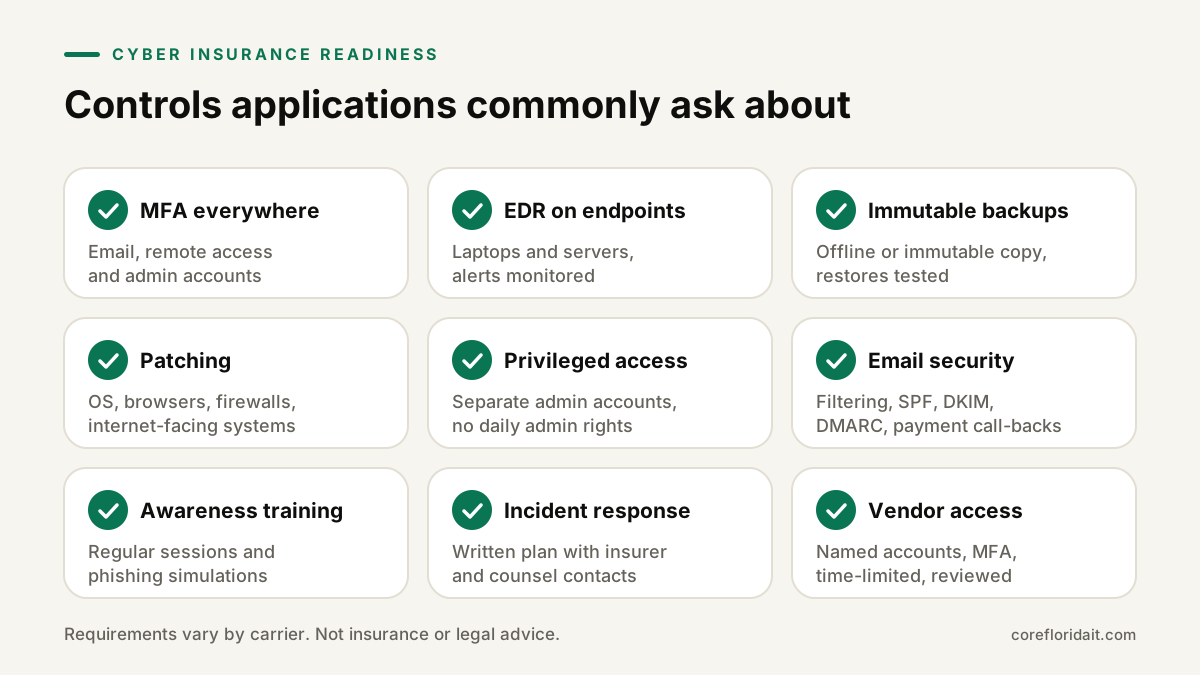
1. Multi-factor authentication (MFA)
Questions usually split MFA into three areas:
- Email (Microsoft 365 or Google Workspace) for all users, including shared and service accounts that can sign in.
- Remote access: VPN, remote desktop gateways, remote-support tools and any web portal into internal systems.
- Privileged/admin accounts: domain admins, cloud global admins, firewall and backup consoles.
Watch for gaps: legacy authentication protocols that bypass MFA, a single "break glass" account without strong protection, or a vendor's remote tool that uses only a password. Phishing-resistant methods such as passkeys or security keys are stronger than SMS codes.
2. Endpoint detection and response (EDR)
Applications often distinguish traditional antivirus from EDR, a tool that records endpoint behavior, detects suspicious activity and can isolate a device. Be ready to say which product, whether it covers servers as well as laptops, and who monitors the alerts (internal staff, your MSP or a managed detection service).
3. Backups: offline or immutable, and tested
Expect questions like: are backups separated from the main network, are they immutable or offline, are they encrypted, how often do you test restores? "We have backups" is not enough; ransomware routinely targets backup consoles. The 3-2-1 approach with an immutable or offline copy and a documented restore test is what you want to be able to describe.
4. Patching and vulnerability management
How quickly critical updates are applied to operating systems, browsers, firewalls and internet-facing systems, and whether unsupported software is still in use. An automated patching tool with reporting gives you something concrete to show.
5. Privileged access management
Do administrators use separate admin accounts? Are local admin rights removed from everyday users? Is there a list of who holds admin access to what? Removing everyday admin rights is one of the most effective controls a small office can implement.
6. Email security
Filtering for phishing and malicious attachments, SPF, DKIM and DMARC on your domain, warning banners on external mail, and a process for verifying payment or bank-detail changes by phone. Business email compromise is a recurring theme in these questionnaires.
7. Security awareness training
Whether staff receive training, how often, and whether you run phishing simulations. Keep completion records.
8. Incident response plan
A written plan that names who decides what, who to call (insurer hotline, breach counsel, IT provider), how to preserve evidence and how to communicate. Many policies expect you to notify the carrier promptly and to use approved vendors, so the plan should include the policy's claim contact details.
9. Vendor and third-party access
How vendors connect (shared passwords versus named accounts with MFA), whether access is time-limited, and whether you review it. Remote-access tools left open for "convenience" are a frequent weak point.
Other common items include asset inventory, end-of-life systems, network segmentation, encryption of laptops, and logging.
How to answer honestly
| Your situation | How to answer | Better next step |
|---|---|---|
| Control fully in place and documented | "Yes", and keep the evidence | Re-check before each renewal |
| Control in place for most users or systems | Describe the exception if the form allows; ask your broker how to disclose it | Close the gap, then update the answer |
| Control in progress | Answer "no" or "partial" as it stands today | Share the implementation date with your broker |
| You don't know | Find out before signing | Ask your IT provider for a written status |
| Question is ambiguous | Ask the broker what the carrier means | Keep their answer in writing |
Practical rules:
- The person signing should understand each answer. Don't let a vendor fill in the form unchecked, and don't sign a form someone else completed without reading it.
- "All" means all. If one legacy server or one executive is exempt from MFA, the honest answer is not an unqualified "all".
- Date your evidence. A screenshot from two years ago does not prove today's configuration.
Documentation to keep
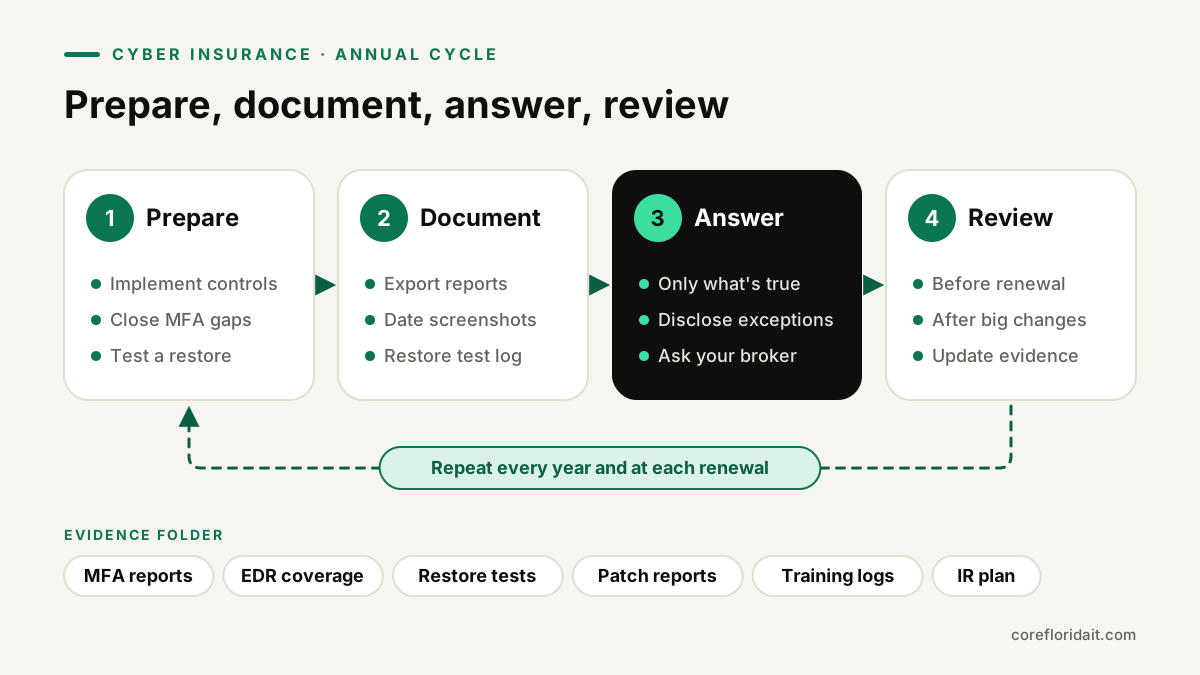
Build a simple "insurance evidence" folder and refresh it before every renewal:
- MFA enforcement reports or conditional access policy exports for email, remote access and admin roles.
- EDR console summary showing device coverage.
- Backup job reports and a restore test record (what was restored, when, by whom, result).
- Patch compliance reports.
- List of admin accounts and who owns them.
- Email authentication records (SPF, DKIM, DMARC) and filtering configuration.
- Training completion logs and phishing simulation summaries.
- Incident response plan with version date and contact list.
- Vendor access list: who, how, MFA status, last review.
- A copy of the signed application itself.
Store the folder somewhere you can reach during an outage, not only on the server that might be encrypted.
How a managed IT provider helps
A good MSP can:
- Map the application questions to your actual environment and show where the gaps are.
- Implement the controls (MFA with conditional access, EDR, immutable backups, patching, admin separation) through managed IT support and cybersecurity services.
- Produce the reports for your evidence folder.
- Join a call with you and your broker to clarify technical questions.
- Rehearse the incident response plan, including a restore.
What an MSP should not do is sign the application for you or tell you an answer is "close enough". The business is responsible for the accuracy of what it submits.
For South Florida companies, plan the review around hurricane season as well. Restore tests, offsite copies and emergency contact lists serve both storm readiness and ransomware readiness, and that overlap is worth using.
Common mistakes
- Answering based on what the IT provider "probably" set up.
- Forgetting service accounts, shared mailboxes and legacy protocols when claiming MFA everywhere.
- Backups that sit on the same domain and network as production, with the same admin credentials.
- Never testing a full restore.
- An incident response plan with no carrier hotline or breach counsel contact.
- Leaving a vendor's always-on remote access tool unmanaged.
FAQ
Do we need all of these controls to get coverage?
Requirements differ by carrier and policy, and they change over time. Your broker can tell you which controls a specific carrier treats as mandatory. From a security standpoint, every control on this list reduces real risk regardless of insurance.
What if we answered something incorrectly last year?
Talk to your broker promptly. Correcting the record proactively is generally better than discovering the problem during a claim. Your attorney can advise on the legal side.
Is Microsoft Defender enough for the EDR question?
Some Microsoft business plans include EDR capabilities and some do not. What matters is which capabilities are licensed, enabled on every device and actually monitored. Confirm the exact configuration rather than assuming.
How often should we review the answers?
At least once a year before renewal, and whenever you add remote access, change providers, move to new systems or open a new office.
If your renewal is coming up and you are not sure every answer is accurate, request a free IT assessment. Core Florida IT will review your controls against the questions, help close the gaps and put the evidence folder together, for offices across Miami, Fort Lauderdale and the rest of South Florida.