AI Document Processing for Small Business: Invoices, Receipts and Forms Without Retyping
A practical guide to AI document processing: the capture-to-export pipeline, schema extraction, validation rules, human review, bilingual documents, privacy and how to run a safe pilot.

AI document processing turns invoices, receipts, intake forms, contracts and bank statements into structured, validated data that flows into your accounting system or CRM, with a person reviewing only the documents the system is unsure about. For a small business, the safe way to adopt it is a defined pipeline (capture, read, extract to a schema, validate, review, export) and a short pilot on one document type before anything runs unattended.
Key takeaways
- AI document processing is a pipeline, not a single tool: capture, OCR or a vision model, schema-based extraction, validation rules, a human review queue and export.
- The model's output is a proposal. Business rules (totals that add up, vendors that exist, no duplicates) decide whether a document is approved, reviewed or rejected.
- Bilingual English/Spanish documents are normal in South Florida; test both languages in the pilot, not just the English samples.
- Privacy is a design choice: decide where documents are processed, who can see them and how long images and extracted data are kept.
- Start with one high-volume document type, measure errors honestly, then expand.
What AI document processing actually is
Traditional OCR converts an image into text. That alone does not help much: someone still has to find the invoice number, the due date and the line items and type them into QuickBooks, Xero, a practice-management system or a spreadsheet. Intelligent document processing (IDP) adds the step that matters. A language or vision model reads the document the way a person would and returns specific fields in a fixed structure that your software can import.
Modern multimodal models can read a scanned PDF, a phone photo of a receipt or a two-column bank statement directly, often without a separate OCR engine. Others still benefit from OCR first, especially for long, text-heavy files. Either way, the business value comes from what happens around the model: the schema, the validation and the review process.
Typical document types for small and mid-sized businesses in Miami-Dade and Broward:
| Document | Typical fields to extract | Where it goes |
|---|---|---|
| Vendor invoices | Vendor, invoice number, date, due date, line items, tax, total | Accounts payable / accounting system |
| Receipts | Merchant, date, amount, payment method, category | Expense reports, bookkeeping |
| Client intake forms | Name, contact data, matter or service type, consent checkboxes | CRM or practice-management system |
| Contracts and leases | Parties, effective date, term, renewal and notice dates, key clauses | Contract register, calendar reminders |
| Bank statements | Account, period, opening and closing balance, transactions | Reconciliation, tax preparation |
| Bills of lading, packing lists | Shipper, consignee, references, piece counts, weights | Freight or logistics software |
Who benefits in South Florida
- CPA and bookkeeping firms in Coral Gables, Brickell and Fort Lauderdale receive client documents in every possible format during tax season. Extracting bank statement transactions and receipts into a reviewable table removes hours of retyping while the accountant keeps the judgment calls. See our IT support for CPA firms.
- Law firms handle intake forms, engagement letters and opposing-party documents. Extracting parties, dates and deadlines into the case system reduces missed details, but a lawyer still owns any legal reading. See IT support for law firms.
- Freight forwarders and logistics companies in Doral work with commercial invoices, packing lists and bills of lading, frequently in English and Spanish from the same shipper.
- Healthcare practices process referral forms, insurance cards and patient intake packets. These contain protected health information, so the processing location and vendor agreements matter as much as accuracy.
The pipeline, step by step
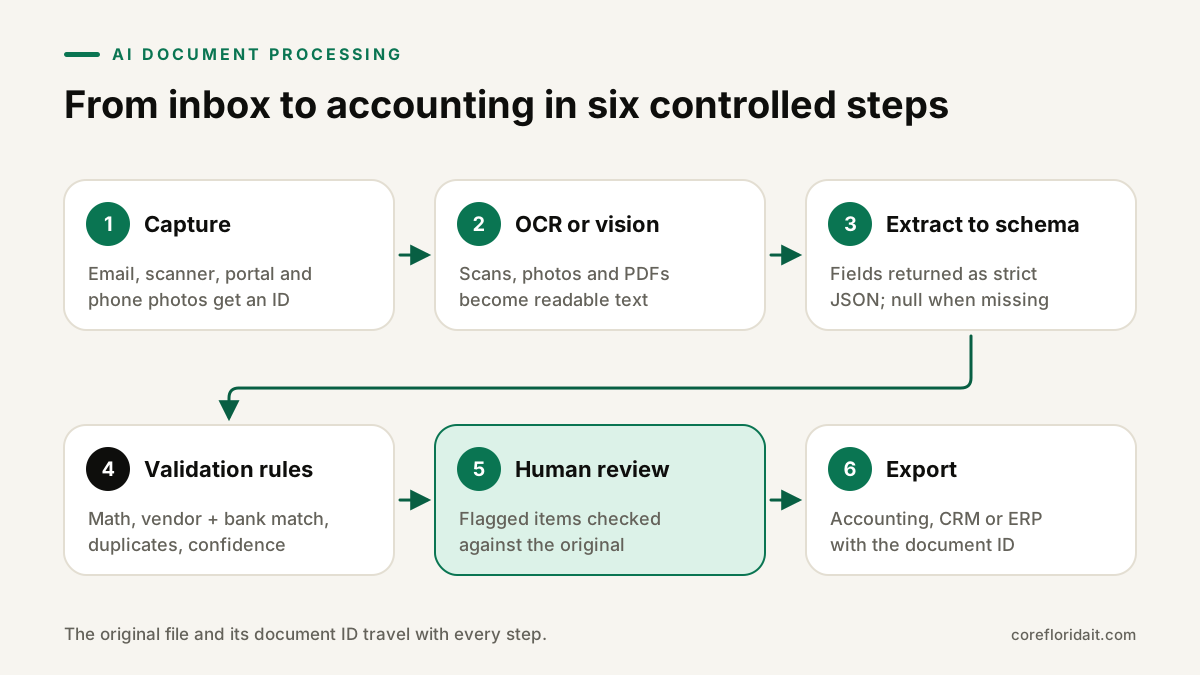
1. Capture
Decide every way documents arrive: a shared mailbox such as [email protected], a scanner that saves to a folder, uploads from a client portal, or photos from a mobile app. Each document gets an ID, a timestamp and its source the moment it enters the system. Store the original file unchanged; every later step references it.
2. Read: OCR or a vision model
For clean digital PDFs, the text layer can often be read directly. For scans and photos, use OCR or a multimodal model. Pre-processing helps more than people expect: deskewing, splitting multi-document scans and rejecting unreadable images early saves review time later.
3. Structured extraction with a schema
This is the core. Instead of asking the model to "summarize this invoice", you give it a strict schema and require output that matches it. A simplified example:
{
  "document_type": "vendor_invoice",
  "vendor_name": "string",
  "vendor_tax_id": "string | null",
  "invoice_number": "string",
  "invoice_date": "YYYY-MM-DD",
  "due_date": "YYYY-MM-DD | null",
  "currency": "USD",
  "line_items": [
    { "description": "string", "quantity": "number", "unit_price": "number", "amount": "number" }
  ],
  "subtotal": "number",
  "tax": "number",
  "total": "number",
  "language": "en | es",
  "field_confidence": { "invoice_number": "high | medium | low", "total": "high | medium | low" }
}
Rules that make extraction reliable:
- Use the structured-output or tool-calling features of your model provider so the response is valid JSON every time.
- Allow
null. A model that is forced to fill every field will invent values; a model allowed to say "not present" will not need to. - Normalize formats in code, not in the prompt: dates to ISO format, amounts to numbers, vendor names matched against your vendor list.
- Keep a link from each extracted field back to the page it came from so a reviewer can verify it quickly.
4. Validation rules
Validation is ordinary code, and it is where accuracy is really controlled. Examples:
- Arithmetic checks: line items add up to the subtotal; subtotal plus tax equals the total.
- Two-field checks: the vendor exists in your master list and the bank or tax ID matches the one on file. A changed bank account on an invoice is a classic fraud signal and should always go to a person.
- Duplicate detection: same vendor plus same invoice number, or same amount and date within a short window, is flagged before it can be paid twice.
- Range and format checks: dates are plausible, due dates come after invoice dates, required fields are present.
- Confidence thresholds: fields the model marks as low confidence, or that your own checks disagree with, are routed to review.
5. Human review queue
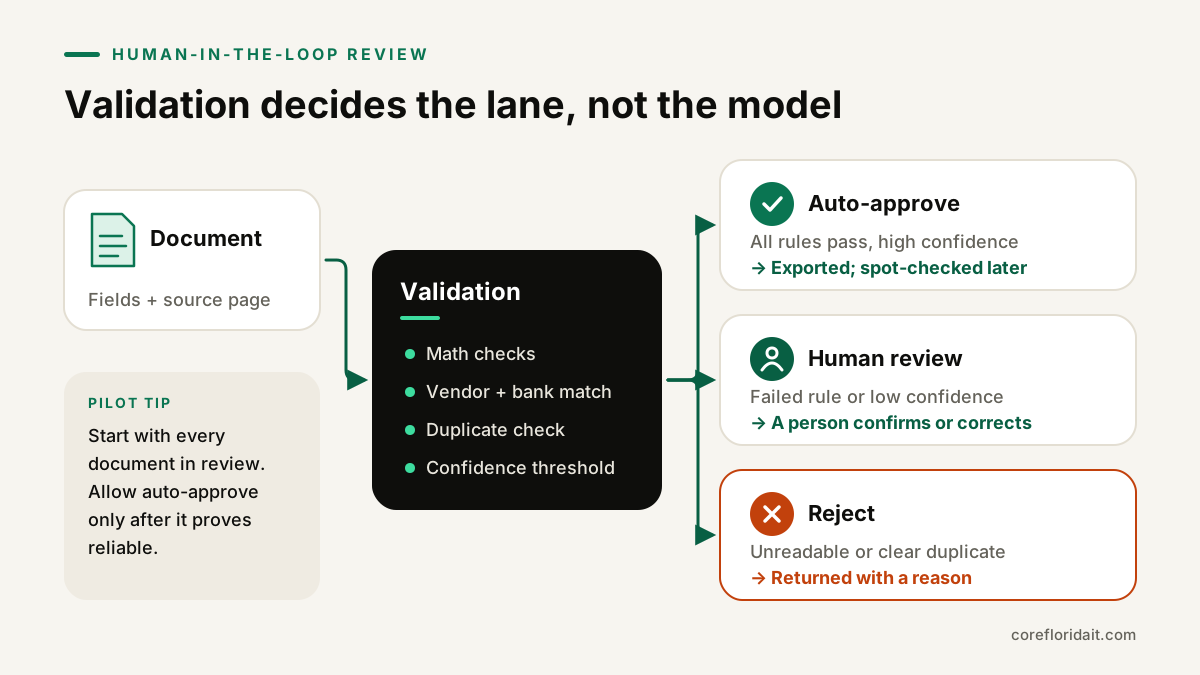
Every document lands in one of three lanes:
| Outcome | When | What happens |
|---|---|---|
| Auto-approve | All validation rules pass, all key fields high confidence, known vendor, no duplicate | Exported automatically; sampled periodically for quality checks |
| Human review | A rule fails, a field is low confidence, a new vendor, a changed bank detail | Reviewer sees the original next to the extracted fields and corrects or confirms |
| Reject | Unreadable, wrong document type, clear duplicate | Returned to the sender or logged with a reason |
At the beginning of a pilot, send everything to review. Only allow auto-approve for a document type after reviewers have seen enough examples to trust it, and keep spot-checking afterwards. Reviewer corrections are valuable: log them and use them to refine prompts, vendor lists and rules.
6. Export
Approved data is written to your accounting system, CRM or practice-management software through its API or an import file, with the document ID attached so anyone can trace a ledger entry back to the source image. Payments themselves should still follow your normal approval process; the pipeline prepares the entry, a person authorizes money leaving the account.
Bilingual EN/ES documents
In Miami, the same supplier may send an English invoice one month and a Spanish one the next, and intake forms often mix both languages. Practical points:
- Keep one schema with English field names regardless of the document language, and record the detected language as a field.
- Watch number and date formats: "1.250,00" and "1,250.00" mean the same amount, and "03/04" can be March 4 or April 3. Normalize in code and route ambiguous dates to review.
- Include Spanish documents in your test set from day one. Accuracy on English samples tells you little about Spanish ones.
- Reviewers should be comfortable in both languages, or the queue should route by detected language.
Privacy, security and retention
Documents contain bank details, tax IDs, health information and client confidences. Before choosing a tool:
- Know where processing happens. Read the provider's data-use terms: whether inputs are retained, for how long and whether they are used for training. Business and API tiers usually differ from consumer apps.
- Healthcare: if documents include PHI, you need a vendor willing to sign a Business Associate Agreement and a configuration that matches it. See our healthcare IT page.
- Least privilege: the pipeline's service account should only read the intake folder and write to the target system, nothing else.
- Retention: decide how long original images, extracted data and logs are kept, and delete on schedule. Florida's data-breach law (section 501.171) also requires reasonable measures to protect personal information and to dispose of it securely.
- Logs: log decisions and document IDs, not full document contents.
Your AI use policy should state that staff must not paste client documents into personal AI accounts; a sanctioned pipeline is the safer alternative.
Start with a pilot
- Pick one document type with high volume and clear rules, usually vendor invoices or receipts.
- Collect a test set of real, representative documents, including bad scans, Spanish documents and unusual vendors. Remove what you don't need.
- Define the schema and rules with the people who do the work today.
- Run in shadow mode: the pipeline extracts, staff process as usual, and you compare results field by field.
- Measure honestly: which fields are wrong, how often, and why. Fix the rules and prompts, not just the symptoms.
- Turn on the review queue, then allow auto-approve only for the cases that have proven reliable.
- Expand to the next document type.
Common mistakes
- Treating the model's output as final, with no validation layer.
- Forcing every field to be filled, which invites made-up values.
- Testing only clean English PDFs.
- Letting extracted bank details update vendor records without a call-back verification.
- Keeping document images forever "just in case".
- Building on a personal chatbot account instead of an API with business data terms.
FAQ
Is AI document processing accurate enough for accounting?
It can be very useful, but accuracy depends on your documents, schema and rules, so you have to measure it on your own samples. The safe design assumes errors will happen: validation rules and a review queue catch them before data reaches your books.
Do we need to replace our accounting software?
Usually not. The pipeline sits in front of your existing system and exports through its API or import files.
Can it handle handwritten forms?
Modern vision models read many handwritten forms, but quality varies widely. Treat handwriting as a review-first category until your own testing shows otherwise.
How long does a pilot take?
It depends on volume and integrations. A focused pilot on one document type is designed to be short and to produce clear evidence about whether expanding makes sense.
Core Florida IT designs and builds these pipelines as part of our AI business apps service, and we train your team to run the review queue through AI training. If invoices, intake forms or statements are eating your team's week, request a free IT assessment or book a Zoom call and we'll help you pick the right first pilot.